7.3.7 Visualization for Law and Order - Video 4: A Heatmap
TL;DR
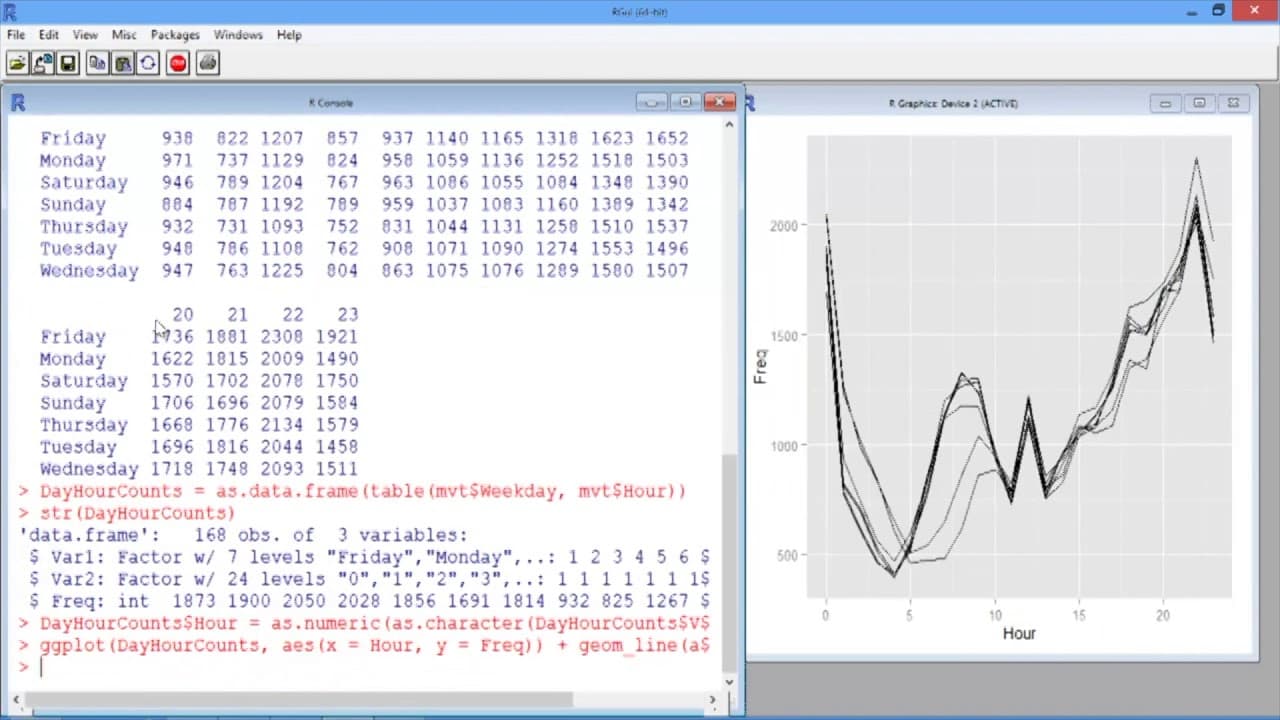
This video demonstrates how to create line plots and heat maps to visualize motor vehicle theft data based on the day of the week and hour of the day, providing insights into crime patterns.
Transcript
In this video, we'll add the hour of the day to our line plot, and then create an alternative visualization using a heat map. We can do this by creating a line for each day of the week and making the x-axis the hour of the day. We first need to create a counts table for the weekday, and hour. So we'll use the table function and give as the first va... Read More
Key Insights
- 🥳 Line plots can be created to show the variation in motor vehicle thefts based on the day of the week and hour of the day.
- 🚦 Heat maps provide a visual representation of crime patterns, with lighter colors indicating higher crime rates at specific hours and days.
- 🥵 The heat map reveals that Friday nights tend to have a higher occurrence of motor vehicle thefts.
- 🥵 Customizing the colors and legend of a heat map can enhance the visualization and emphasize specific crime patterns.
- 🫥 Both line plots and heat maps are valuable tools for understanding and analyzing crime data.
- 🥵 Changing the color scheme in a heat map can alter the perception of crime intensity, allowing for different interpretations and emphasis.
- 🥵 Heat maps are particularly useful in identifying crime hotspots or areas where criminal activity is more prevalent.
Install to Summarize YouTube Videos and Get Transcripts
Explore YouTube Video Summarizer or Get YouTube Transcript Extractor
Questions & Answers
Q: How can we identify which line corresponds to each day of the week in the line plot visualization?
To associate colors with the days of the week, you can add "color = Var1" after "group = Var1" in the ggplot function. This will color the lines according to the day they represent, making it easier to interpret the plot.
Q: What do the colors in the heat map represent?
In the heat map, the colors of the rectangles indicate the frequency or number of crimes occurring at a specific hour and day. Lighter colors indicate a higher number of crimes, while darker colors represent lower crime rates.
Q: Can we customize the legend in the heat map?
Yes, you can change the legend title by using "name = 'Total MV Thefts'" in the scale_fill_gradient function. To remove the y-axis label, you can add "theme(axis.title.y = element_blank())" after the scale_fill_gradient function.
Q: How can we change the color scheme of the heat map?
To modify the color scheme, you can adjust the "low" and "high" values in the scale_fill_gradient function. For example, setting "low = 'white'" and "high = 'red'" would make lower values appear as white and higher values as red.
Summary & Key Takeaways
-
The video explains how to create a line plot by categorizing motor vehicle thefts based on the day of the week and hour of the day, allowing for the visual comparison of crime counts.
-
The video then demonstrates the creation of a heat map using the same data, where each rectangle represents the frequency of crimes for a specific hour and day.
-
The heat map reveals patterns, such as higher crime rates around midnight and on weekends.
Read in Other Languages (beta)
Share This Summary 📚
Summarize YouTube Videos and Get Video Transcripts with 1-Click
Try YouTube Summary with ChatGPT & Claude or YouTube Transcript Generator
Explore More Summaries from MIT OpenCourseWare 📚

Summarize YouTube Videos and Get Video Transcripts with 1-Click
Try YouTube Summary with ChatGPT & Claude or YouTube Transcript Generator