iPadOS 15 Review: Dropped Expectations!
TL;DR
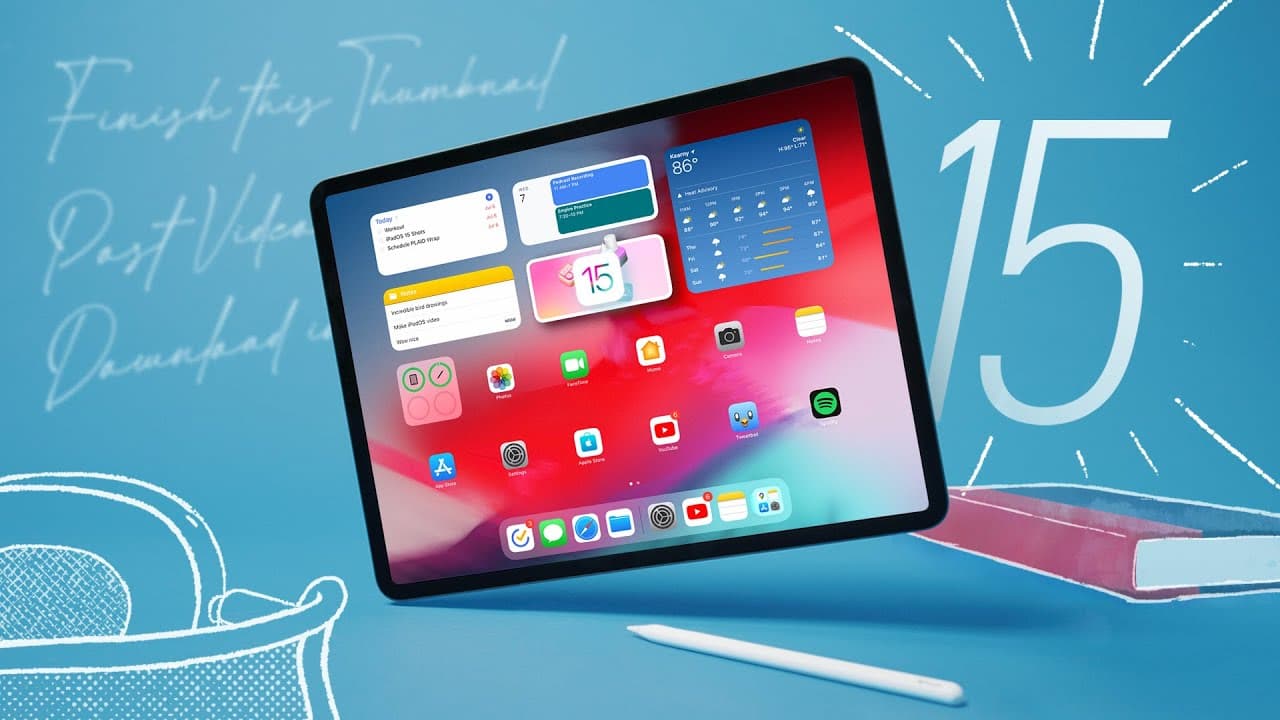
The iPad OS 15 update brings some improvements, including the ability to put widgets anywhere on the home screen and enhanced multitasking options. However, it still falls short of making the iPad a complete computer replacement.
Transcript
hey what's up mkbhd here so this is the ipad pro this is the m1 ipad at the top of the food chain best ipad there is and i've been using this thing a lot for the last month or so and i really like it and like a lot of other ipad users it's just really enjoyable to use this ipad but i still wanted more from it because as you probably remember from t... Read More
Key Insights
- 👪 The iPad OS 15 update brings welcome improvements, such as the ability to place widgets anywhere on the home screen, enhancing customization options.
- 😀 Multitasking capabilities have been enhanced with a more visible and accessible window management system, improving the overall user experience when using multiple apps simultaneously.
- 😀 The Notes app receives notable upgrades, including quick note-taking, easy integration of content from various sources, and excellent handwriting recognition.
- 💻 Despite these improvements, iPad OS 15 falls short of making the iPad a complete computer replacement, as it still lacks certain software capabilities and functionality found in traditional computers.
- 👤 The update will benefit all iPad users, including those with lower-end models, as it enhances the overall user experience and functionality of the device.
- 🖕 Apple's strategy of positioning the iPad as a middle ground between the iPhone and Mac is likely to continue, as the company aims to avoid cannibalizing its own products.
- 👤 While the iPad OS 15 update may not meet the expectations of users seeking a full computer replacement, it does make the time spent using the iPad more enjoyable and efficient.
Install to Summarize YouTube Videos and Get Transcripts
Explore YouTube Video Summarizer or Get YouTube Transcript Extractor
Questions & Answers
Q: What are the major improvements in the iPad OS 15 update?
The major improvements in iPad OS 15 include the ability to place widgets anywhere on the home screen, enhanced multitasking with a more visible window management system, and significant upgrades to the Notes app, including quick note-taking and content integration.
Q: Does iPad OS 15 make the iPad a complete computer replacement?
No, iPad OS 15 falls short of making the iPad a complete computer replacement. While it brings some improvements in terms of multitasking and customization, there are still limitations in terms of software capabilities and functionality compared to traditional computers.
Q: What are the standout features of the new multitasking options?
The new multitasking options in iPad OS 15 provide a more visible and easily accessible window management system. Users can now split-screen apps, use slide over for quick access to apps, and even have multiple instances of the same app open. These features improve the overall multitasking experience on the iPad.
Q: How has the Notes app been improved in iPad OS 15?
The Notes app has received significant improvements in iPad OS 15. The addition of quick notes allows users to quickly jot down notes or add content from various sources, such as websites or photos. The app also features excellent handwriting recognition and seamless syncing across Apple devices.
Summary & Key Takeaways
-
The iPad OS 15 update introduces the freedom to place widgets anywhere on the home screen, improving customization and user experience.
-
Multitasking capabilities have been enhanced with a more visible and easily accessible window management system, allowing for easier split-screen and slide over functions.
-
The Notes app receives significant improvements, including the ability to quickly jot down notes, easily add content from various sources, and excellent handwriting recognition.
Read in Other Languages (beta)
Share This Summary 📚
Summarize YouTube Videos and Get Video Transcripts with 1-Click
Try YouTube Summary with ChatGPT & Claude or YouTube Transcript Generator
Explore More Summaries from Marques Brownlee 📚



Summarize YouTube Videos and Get Video Transcripts with 1-Click
Try YouTube Summary with ChatGPT & Claude or YouTube Transcript Generator