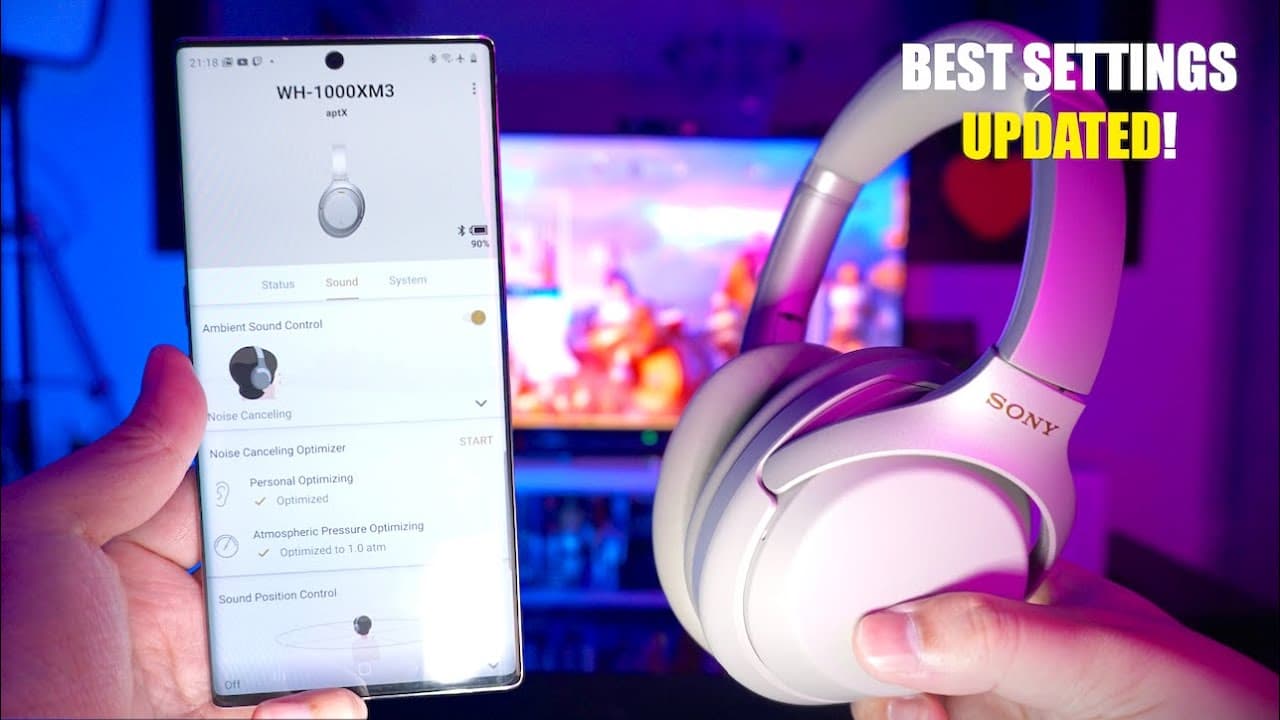
UPDATED Sony WH-1000XM3 Best Custom Settings | App 7.0.1
TL;DR
Explore the new custom settings for Sony WH-1000XM3 headphones through the updated Sony Connect app.
Transcript
hey guys what's up it's me again welcome back to another video the last custom settings video that I made for the xf3 headphones is still quite popular today which is amazing because that video was made in 2018 but recently the Sony headphones Connect app went through a few changes it's got a new interface some new features as well so I thought it ... Read More
Key Insights
- 😀 The Sony Headphones Connect app has undergone significant updates, improving user experience and accessibility to settings.
- 👻 Adaptive sound control is crucial for balancing awareness and immersion, allowing users to enjoy music while staying alert to surroundings.
- ⚾ Customizable settings based on actions and frequent locations provide personalized audio experiences.
- 👂 Fine-tuning microphone sensitivity and sound focus features enhances the usability of headphones in various environments.
- 🐕🦺 The headphones support 360 Reality Audio, enabling a spatial auditory experience that requires subscriptions to specific streaming services.
- 👤 Noise cancellation can be optimized for individual users, accommodating personal preferences and physical needs.
- 🔋 Setting automatic power-off intervals is essential for conserving battery life during daily use.
Install to Summarize YouTube Videos and Get Transcripts
Explore YouTube Video Summarizer or Get YouTube Transcript Extractor
Questions & Answers
Q: What are the new features in the Sony Headphones Connect app?
The updated Sony Headphones Connect app introduces a new interface that separates settings into different tabs: status settings, sound adjustment, and system settings. This makes it easier for users to navigate and customize their listening experience without feeling overwhelmed by a single long scrollable page.
Q: How does adaptive sound control function on the Sony WH-1000XM3 headphones?
The adaptive sound control feature automatically adjusts noise canceling and ambient sound levels based on a user's actions or location. Users can set personalized ambient sound settings for specific activities, like walking or running, which allows for increased awareness of surroundings, especially in potentially dangerous situations involving vehicles.
Q: What settings should I consider for walking in a busy area?
When walking in a busy area, it is advisable to set the ambient sound level higher to at least level 20, particularly to hear electric vehicles. Activating the “focus on voice” feature can also be beneficial; however, it should be used cautiously on busy streets as it may reduce awareness of other sounds like approaching vehicles.
Q: Can the headphones learn my frequent locations and adjust sound settings automatically?
Yes, the adaptive sound control feature allows headphones to learn frequently visited locations, using Google Maps API to customize ambient sound levels based on those locations. Users can register specific sites on the map, enabling the headphones to automatically set sound levels when entering those locations for a tailored listening experience.
Q: What is the purpose of the noise-canceling optimizer feature?
The noise-canceling optimizer is designed to fine-tune the headphones’ noise-canceling capabilities according to the listener’s environment and the physical characteristics of their ears. This optimization process alleviates any discomfort or pressure that some users might experience while using the headphones, allowing for a more comfortable listening session.
Q: What options are available for audio quality preferences?
Users can choose between "priority on sound quality" and "priority on stable connection." Selecting "priority on sound quality" enhances audio clarity, while "priority on stable connection" is useful in crowded areas to maintain connectivity by using less bandwidth. Users should select the one based on their listening environment and experiences.
Summary & Key Takeaways
-
The video discusses updated features and the interface of the Sony Headphones Connect app, which now organizes settings into distinct tabs for easier navigation.
-
It highlights the adaptive sound control feature, allowing users to customize noise cancelation and ambient sound levels based on activities and locations for enhanced safety and listening experience.
-
Viewers receive personalized recommendations on managing audio settings, including those for various scenarios like walking, running, and using public transport.
Read in Other Languages (beta)
Share This Summary 📚
Summarize YouTube Videos and Get Video Transcripts with 1-Click
Try YouTube Summary with ChatGPT & Claude or YouTube Transcript Generator
Explore More Summaries from Aaron X Loud and Wireless 📚





Summarize YouTube Videos and Get Video Transcripts with 1-Click
Try YouTube Summary with ChatGPT & Claude or YouTube Transcript Generator