Remove unwanted keyboard or language from Windows 11
TL;DR
Learn how to remove installed keyboards on your device.
Transcript
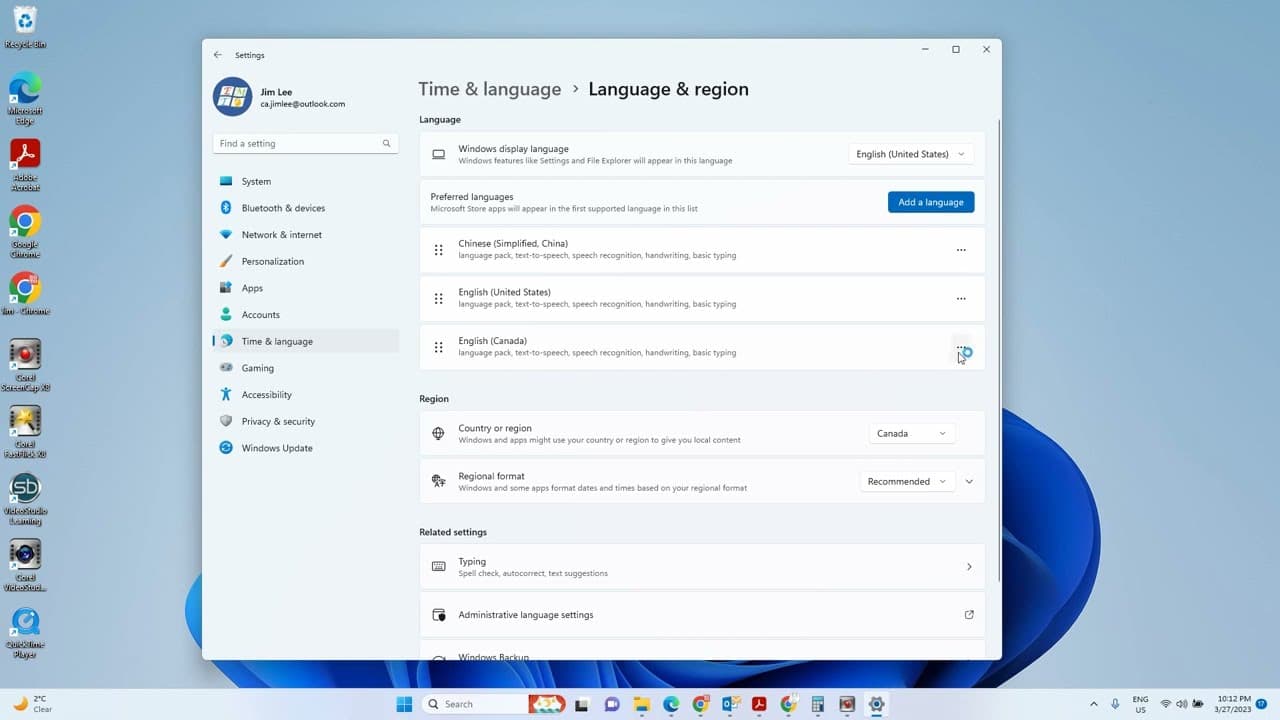
hello in this video we'll talk about how to remove the installed keyboard so when I check the keyboard and you can see I have a one two three while my English is United International English okay let's see how to remove them let's go to the settings then go to Tamil language okay so from here you can see we only has two keyboard installed let's see... Read More
Key Insights
- 🎹 Removing installed keyboards requires accessing language settings on your device.
- 🎹 The primary language setting affects which keyboards can be removed, particularly if a keyboard is set as default.
- 🎹 Users may need to adjust their keyboard hierarchy by reinstalling certain keyboards to make unwanted ones removable.
- ❓ The process involves navigating through device settings, specifically under language and region preferences.
- 🎹 It’s important to ensure that you have alternate keyboards available before attempting to remove a primary one.
- 🎹 The demonstration illustrates practical troubleshooting techniques for managing keyboard installations.
- 👤 Efficient removal of keyboards can enhance user interface experience by minimizing clutter.
Install to Summarize YouTube Videos and Get Transcripts
Explore YouTube Video Summarizer or Get YouTube Transcript Extractor
Questions & Answers
Q: What is the main objective of the video?
The main objective of the video is to guide users through the process of removing installed keyboards on their device. It emphasizes the importance of understanding language settings and how they affect keyboard management, ensuring that users can customize their typing experience to better suit their needs.
Q: Why can't I remove certain keyboards immediately?
Certain keyboards cannot be removed if they are set as the primary language or if they are the default option. In the video, it is explained that users must change their primary keyboard or language setting to remove the unwanted keyboard. The order of the installed keyboards affects their removability.
Q: What steps should I take to remove a keyboard successfully?
To remove a keyboard, first go to the settings and access the language options. From there, check the installed keyboards and determine which one you want to remove. You may need to reinstall a keyboard if it is currently designated as the primary option to make it removable.
Q: What was the featured issue concerning the Canadian English keyboard?
The issue with the Canadian English keyboard was that it could not be removed because it was not displaying in the settings due to the default English keyboard occupying the primary slot. The video suggested reinstalling the Canadian English keyboard to allow for its removal successfully afterward.
Q: How does reinstalling a keyboard help with the removal process?
Reinstalling a keyboard can help with the removal process by resetting its position within the keyboard list. In the video, reinstalling the Canadian English keyboard made it possible to remove it afterward because it allowed users to reestablish the keyboard hierarchy, facilitating the removal of less preferred keyboards.
Q: What happens when only one keyboard is installed?
When only one keyboard is installed, the option to remove it is typically unavailable. This is to ensure that users always have at least one working keyboard on their device. The video illustrates this by showing that without alternative keyboards, removal options become limited.
Summary & Key Takeaways
-
The video provides a step-by-step guide on how to remove installed keyboards on a device, focusing on language settings.
-
It explains that certain keyboards cannot be removed if they are the primary language, requiring users to adjust language preferences first.
-
The video concludes with a successful demonstration of removing unnecessary keyboards, enhancing user experience.
Read in Other Languages (beta)
Share This Summary 📚
Summarize YouTube Videos and Get Video Transcripts with 1-Click
Try YouTube Summary with ChatGPT & Claude or YouTube Transcript Generator
Explore More Summaries from E Micro Tech 📚

Summarize YouTube Videos and Get Video Transcripts with 1-Click
Try YouTube Summary with ChatGPT & Claude or YouTube Transcript Generator