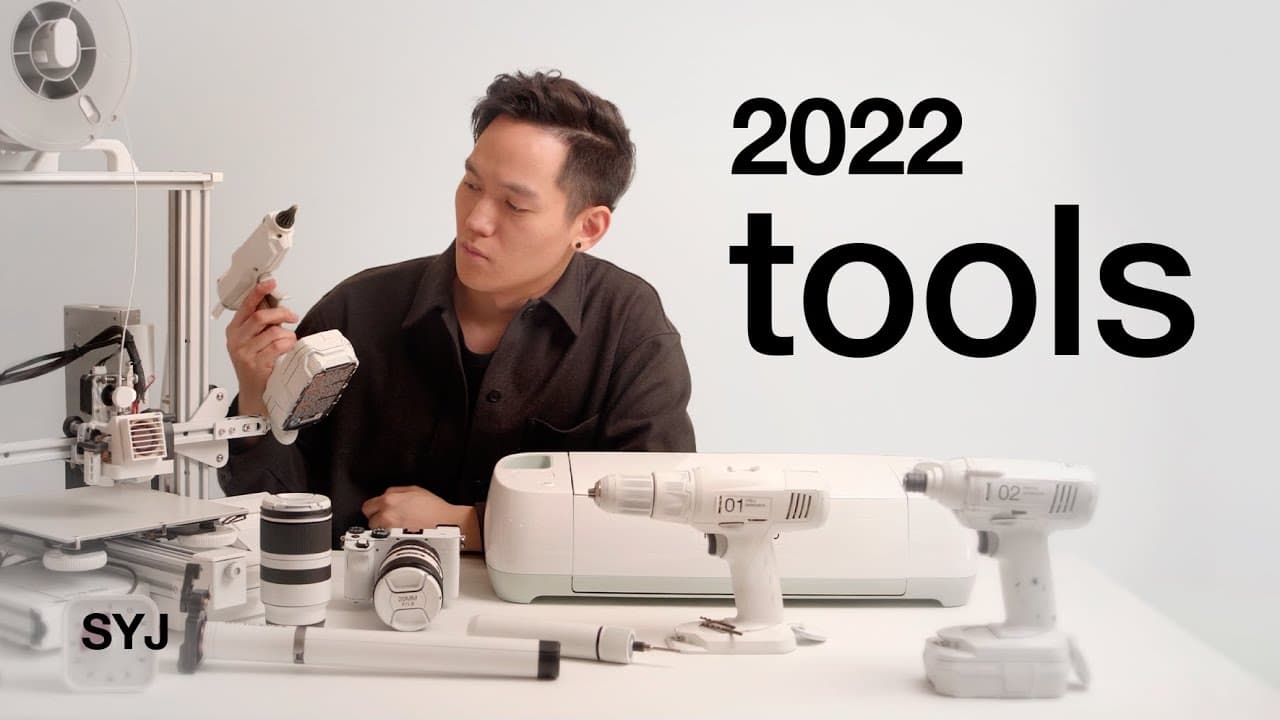
42 Tools That Made The Cut in 2022
TL;DR
The content features a YouTuber sharing the tools he uses for YouTube filmmaking, desk setup, and art & design projects, emphasizing the importance of customization and storytelling.
Transcript
so I've been making YouTube videos for almost two years now and there are a few questions I always get how do you make the stickers in your projects how do I make my videos how do I edit my video what tools do I use what tool is this and how do I hang my toilet paper and it's time for some answers so these are the noteworthy tools that make all my ... Read More
Key Insights
- 🎥 The content creator has been making YouTube videos for almost two years and receives frequently asked questions about their video-making process, editing tools, and equipment. They emphasize that the important aspect is the story you tell, not necessarily the tools you use.
- 📹 The focus of their filmmaking setup is on quality and efficiency. They use a quick release plate on all their devices, including their main camera, the Sony a7c, and a point-and-shoot camera, the zv1. They also utilize tripods and a portable gorilla pod with magnetic feet for more versatility.
- 🎙️ They rely on the Rode Wireless go mics, which can magnetically attach to clothing and provide great audio quality. They also mention using a motorized slider for smooth camera movements in their videos.
- 📱 They discuss the convenience of using the iPhone 12 Pro, particularly for quick and spontaneous shots. They have designed a custom mount using MagSafe magnets.
- 🔌 They showcase Ugreen's 65-watt indigenous Cube, a powerful and compact charging solution for multiple devices. They also mention a 7-in-1 USB-C adapter and a desktop tablet stand from Ugreen.
- 🖥️ In terms of desk setup and productivity tools, they highlight a visual timer for managing focused tasks and breaks. They also enjoy using a mechanical keyboard and blank hotel cards as reusable whiteboards.
- 🎵 They showcase a Spotify card device that allows for easy control of their music without distraction.
- 🎞️ They mention using Adobe Premiere Pro and After Effects for video editing and Fusion 360 for 3D modeling.
- 🔧 They discuss 3D printing tools, including the M3 Pro and Ender Series Pro printers, as well as the usefulness of small flush cutters for filament and wire cutting. They also highlight a deburring tool for chamfering and refining 3D prints.
Install to Summarize YouTube Videos and Get Transcripts
Explore YouTube Video Summarizer or Get YouTube Transcript Extractor
Questions & Answers
Q: What camera does the YouTuber use for serious filmmaking?
The YouTuber uses the Sony a7c for serious filmmaking projects. He finds it to be the most suitable for his needs, although he also uses other devices for casual and spontaneous shots.
Q: What is the purpose of the magnetic helping hand tools?
The magnetic helping hand tools are used by the YouTuber during soldering and working on his 3D printer. They allow him to easily attach them to metal parts and hold objects in place, making the process more convenient.
Q: What software does the YouTuber use for editing his videos?
The YouTuber uses Adobe Premiere Pro for video editing and After Effects for special effects. Additionally, he uses Fusion 360 for 3D modeling.
Q: What is the YouTuber's favorite knife and why?
The YouTuber's favorite knife is the one with a spring-loaded blade, as it is quick and easy to retract. He finds it to be well-designed and uses it specifically for cutting boxes.
Q: How does the YouTuber manage his time and stay productive?
The YouTuber utilizes a visual timer to track his focus tasks and breaks, finding it helpful in managing his time effectively. He also uses blank Hotel cards as reusable whiteboards for writing to-do lists and brainstorming.
Summary & Key Takeaways
-
The YouTuber discusses the tools he uses for YouTube filmmaking, focusing on speed and ease of use.
-
He shares his camera setup, including the Sony a7c, the zv1, and the iPhone 12 Pro.
-
The content also covers his desk setup, productivity tools, and the art and design tools he relies on, such as 3D printers, knives, and label makers.
Read in Other Languages (beta)
Share This Summary 📚
Summarize YouTube Videos and Get Video Transcripts with 1-Click
Try YouTube Summary with ChatGPT & Claude or YouTube Transcript Generator
Explore More Summaries from Scott Yu-Jan 📚

Summarize YouTube Videos and Get Video Transcripts with 1-Click
Try YouTube Summary with ChatGPT & Claude or YouTube Transcript Generator