How to use your trained model - Deep Learning basics with Python, TensorFlow and Keras p.6
TL;DR
Learn how to use a trained deep learning model to make predictions on new images.
Transcript
what is going on everybody and welcome to part 6 of the deep learning in Python with tens flow and caris tutorial series in this video we're going to be talking about how do I use my model so a lot of people have been asking ok great we trained and tested our you know data set or whatever but like ok I've got some outside images how do I use these ... Read More
Key Insights
- 🏆 Training and testing a deep learning model is crucial before using it for predictions.
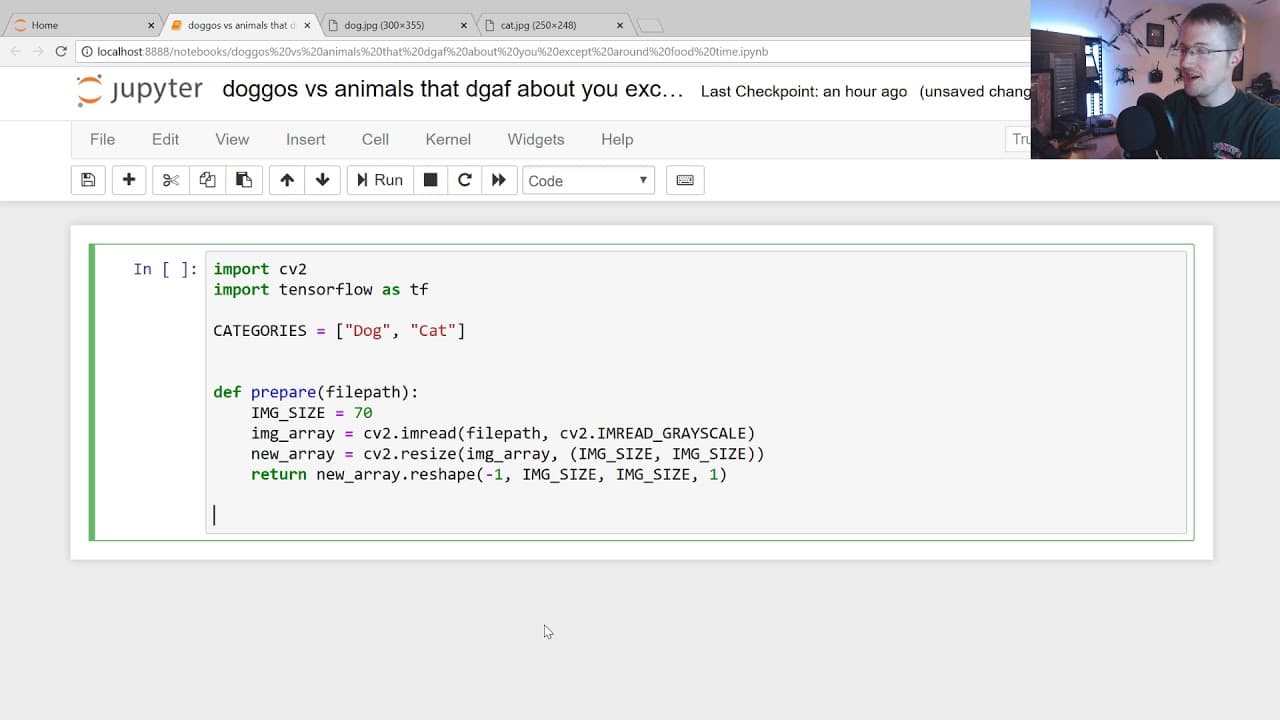
- 👶 Preprocessing new images involves resizing, grayscale conversion, and reshaping.
- 👤 Loading a trained model in Tensorflow can now be done without defining it first, making the process more user-friendly.
- 👂 The predict function in Tensorflow returns a list of predictions, which can be converted to integers and mapped to corresponding labels.
- ⚖️ It's important to assess the accuracy and balance of predictions made by the model before using it in production.
- 💨 The predict function is fast, especially when only predicting without loading the model each time.
- 😒 There are options to batch predictions or use TensorFlow Serving for scalable production deployment.
Install to Summarize YouTube Videos and Get Transcripts
Explore YouTube Video Summarizer or Get YouTube Transcript Extractor
Questions & Answers
Q: How can I make predictions on new images using a trained deep learning model?
To make predictions, you need to import the required libraries, preprocess the new images, load the trained model, and pass the preprocessed images through the model's predict function.
Q: Do I need to define the model before loading it in Tensorflow?
No, in Tensorflow's Keras API, you can directly load the model without defining it beforehand. This makes the process more convenient.
Q: What type of image preprocessing is required before making predictions?
The tutorial suggests resizing the image to a specified size (e.g., 70x70), converting it to grayscale, and reshaping it to match the input dimensions required by the model.
Q: What is the significance of using a one hot array for categorical classifications?
Previously, one hot arrays were used for categorical classifications. However, now it is possible to use sparse scalar classifications, which simplifies the code and eliminates the need for additional steps like NP argmax.
Summary & Key Takeaways
-
This video tutorial focuses on using a pre-trained deep learning model for making predictions on new images.
-
The tutorial covers how to import the necessary libraries, preprocess the images, load the model, and make predictions.
-
The video explains the process step-by-step and provides code examples for better understanding.
Read in Other Languages (beta)
Share This Summary 📚
Summarize YouTube Videos and Get Video Transcripts with 1-Click
Try YouTube Summary with ChatGPT & Claude or YouTube Transcript Generator
Explore More Summaries from sentdex 📚






Summarize YouTube Videos and Get Video Transcripts with 1-Click
Try YouTube Summary with ChatGPT & Claude or YouTube Transcript Generator