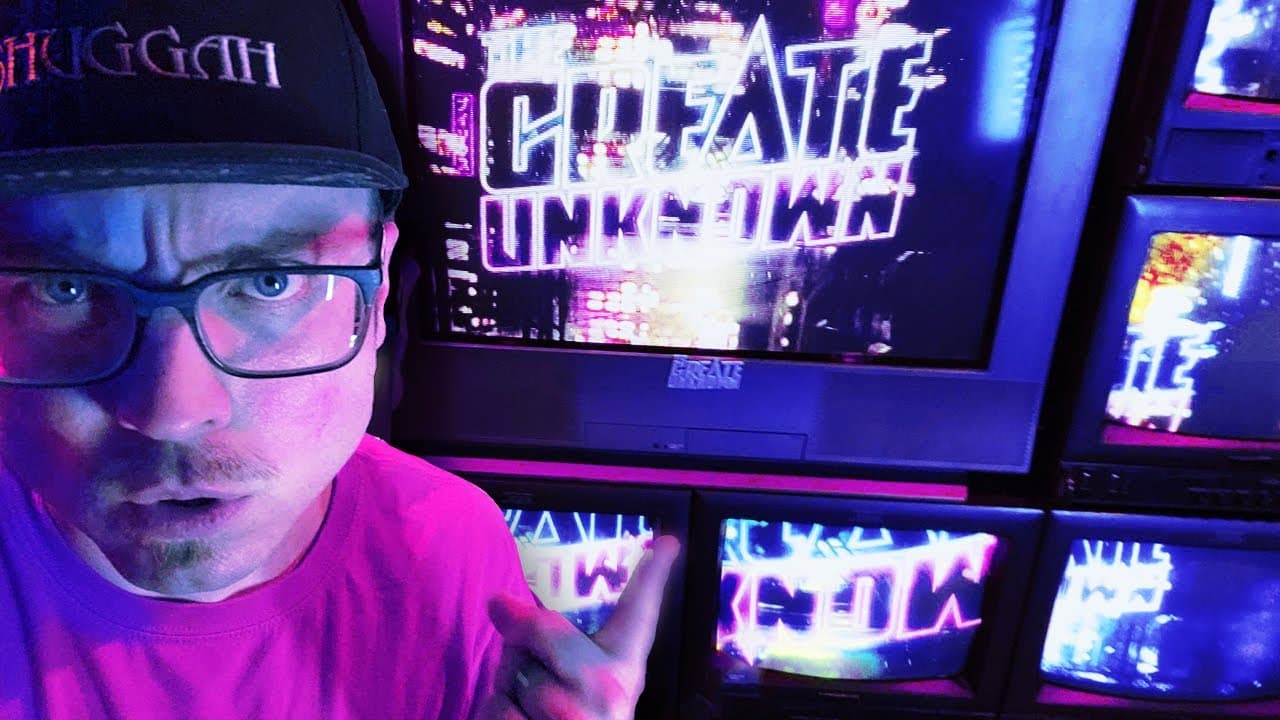
How The Create Unknown TV Wall Works
TL;DR
"Find out how the TV wall works for the Create Unknown podcast, with cameras hardwired to multiple monitors to showcase guest appearances."
Transcript
hello is this thing on we're gonna do a quick and dirty video explaining how the TV wall works the TV wall on the create unknown it's a little complicated very analog maybe overly complicated but that's why I like it okay first of all the guest appears on this laptop right here which is on a laptop stand that you can see and so the guests can see u... Read More
Key Insights
- 🥶 The TV wall setup for the Create Unknown podcast involves a combination of analog equipment, including a laptop, boombox, and old security cameras.
- 👻 The laptop stand allows the guest to see the hosts through the camera, while the hosts view the guest on the monitor mounted on the wall.
- 😒 The use of labeled security cameras pointing at different sections of the screen provides a dynamic representation of the guest's appearance on each TV in the wall setup.
- 📺 The monitor and studio monitors on the TV wall were generously borrowed from a world-famous TV/video artist named Jonas Brewers.
- 📺 The TV wall setup is purely analog and does not rely on any software or green screen technology. The cameras are directly connected to each TV for a genuine visual experience.
- 👻 The TV wall setup adds a unique and visually engaging element to the Create Unknown podcast, showcasing the creativity and technical prowess of the hosts and their guests.
- 📺 The unconventional use of repurposed equipment, such as the boombox with a TV inside, adds a whimsical touch to the TV wall setup.
Install to Summarize YouTube Videos and Get Transcripts
Explore YouTube Video Summarizer or Get YouTube Transcript Extractor
Questions & Answers
Q: How is the guest able to see the hosts during the podcast?
The guest can see the hosts through the camera in the laptop, which is placed on a laptop stand. This setup allows for visual communication between the hosts and the guest.
Q: What is the purpose of the boombox in the TV wall setup?
The boombox serves as a pathway for the HDMI signal, which goes from the laptop to the monitor mounted on the wall in the closet. Inside the boombox is a TV that helps transmit the signal.
Q: Why are old security cameras used in the TV wall setup?
The old security cameras are repurposed and utilized to point at different sections of the monitor. Each camera's labeled section corresponds to a different TV in the wall setup, enabling the guest's appearance to be showcased seamlessly.
Q: Is there any software or green screen technology involved in the TV wall setup?
No, the TV wall setup is entirely analog. There is no software or green screen technology used. The cameras are hardwired to each TV, creating a unique visual experience for the viewers.
Summary & Key Takeaways
-
The TV wall setup for the Create Unknown podcast involves a laptop stand with a camera, allowing guests to see the hosts and vice versa.
-
The HDMI signal is routed through a boombox with a TV inside, then connected to a monitor mounted on a wall in a closet, which has multiple old security cameras pointing at it.
-
Each camera on the monitor is labeled and corresponds to a different section of the screen, showcasing the guest's appearance.
Read in Other Languages (beta)
Share This Summary 📚
Summarize YouTube Videos and Get Video Transcripts with 1-Click
Try YouTube Summary with ChatGPT & Claude or YouTube Transcript Generator
Explore More Summaries from The Create Unknown 📚
![Drew Durnil: History YouTube's Accidental Academic [Ep. 76] thumbnail](/_next/image?url=https%3A%2F%2Fi.ytimg.com%2Fvi%2F-ZGFQR6CsG8%2Fhqdefault.jpg&w=750&q=75)
![Is Inside a Mind YouTube's Best Storyteller? [Ep. 87] thumbnail](/_next/image?url=https%3A%2F%2Fi.ytimg.com%2Fvi%2F-zgftlzq6Dw%2Fhqdefault.jpg&w=750&q=75)
![Struggling with Scott Cramer [Ep. 72] thumbnail](/_next/image?url=https%3A%2F%2Fi.ytimg.com%2Fvi%2F0Zb2NO-9bc0%2Fhqdefault.jpg&w=750&q=75)

Summarize YouTube Videos and Get Video Transcripts with 1-Click
Try YouTube Summary with ChatGPT & Claude or YouTube Transcript Generator