How to Scan + Clean Up Illustrations in Photoshop
TL;DR
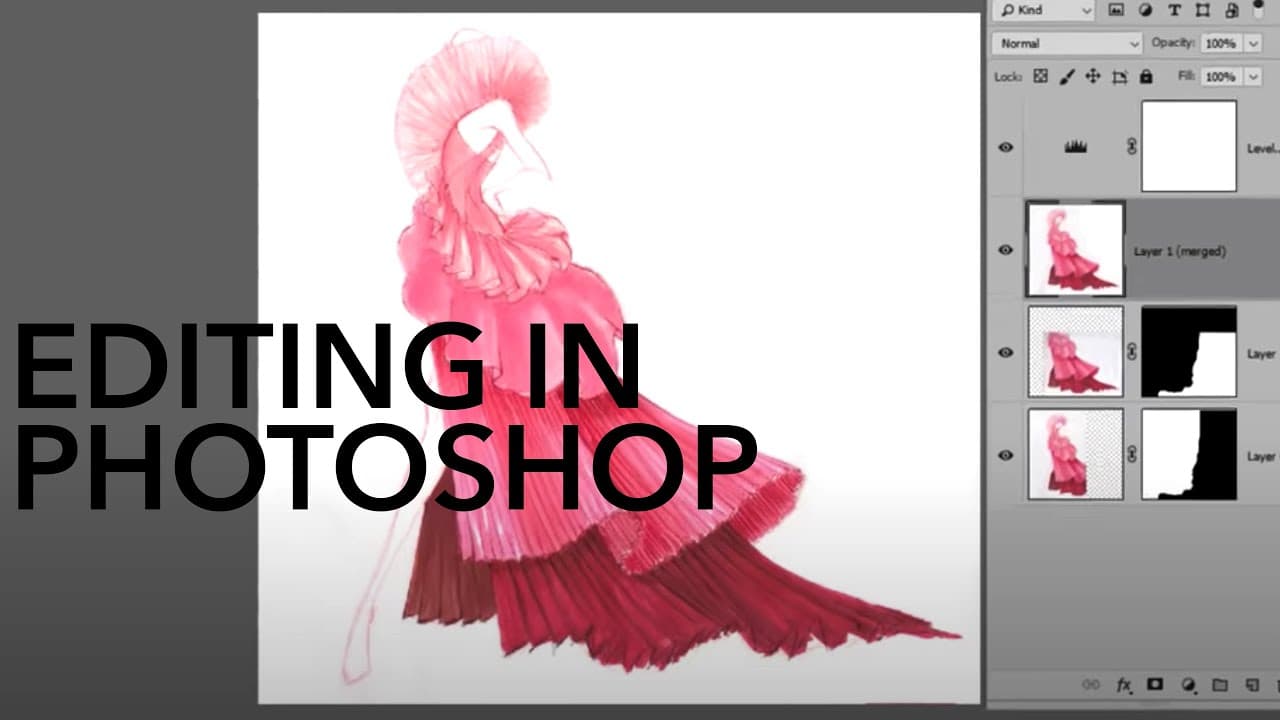
Learn how to clean up scanned fashion illustrations in Photoshop using techniques like rotating, removing backgrounds, aligning images, adjusting colors, and adding shadows and highlights.
Transcript
hi gang I'm Robyn Schneider and I'm guest lecturing on Zoe Hong's Channel today I teach digital fashion design at Otis College of Art and Design and I'm the author of the Adobe for fashion textbook in this video I'm going to teach you some photoshop techniques for cleaning up your scanned fashion illustrations so so it gave me a few fashion illustr... Read More
Key Insights
- ✋ Scanning illustrations at a high resolution (300 dpi) is crucial for maintaining quality.
- 💨 The magic eraser tool is an easy way to remove backgrounds with good contrast.
- 🚨 Photoshop's aligning and blending commands can seamlessly merge multiple scanned images.
- 🔨 The lasso tool can be used to make selections, while the dodge and burn tools can add depth to illustrations.
Install to Summarize YouTube Videos and Get Transcripts
Explore YouTube Video Summarizer or Get YouTube Transcript Extractor
Questions & Answers
Q: What is the recommended scanning resolution for fashion illustrations?
It is important to scan illustrations at a high resolution of 300 dpi to ensure the best quality work.
Q: How can the magic eraser tool remove backgrounds easily?
The magic eraser tool can quickly remove backgrounds by simply clicking on the page if there is good contrast between the image and the background. Clicking on different areas of the background will remove it.
Q: How can Photoshop align and blend images scanned in multiple pieces?
By selecting both layers of the scanned images and using the "Auto align layers" command, Photoshop can automatically align the pieces. The "Auto blend layers" command can then blend the colors together for a seamless final result.
Q: What tools can be used to add shadows and highlights to illustrations?
The dodge tool can create highlights, while the burn tool can add shadows. By adjusting the brush size and intensity, you can easily paint shadows and highlights onto the illustration.
Summary & Key Takeaways
-
Scanning illustrations at a high resolution (300 dpi) is crucial for maintaining the best quality.
-
The magic eraser tool can easily remove backgrounds with good contrast between the image and the background.
-
Photoshop can align and blend images scanned in multiple pieces, creating a seamless final result.
-
The lasso tool can be used to make selections, and the dodge and burn tools can add shadows and highlights for more depth.
-
To put the cleaned up illustration on a background, the image can be merged and placed on a new page with a desired background color.
Read in Other Languages (beta)
Share This Summary 📚
Summarize YouTube Videos and Get Video Transcripts with 1-Click
Try YouTube Summary with ChatGPT & Claude or YouTube Transcript Generator
Explore More Summaries from Zoe Hong 📚


Summarize YouTube Videos and Get Video Transcripts with 1-Click
Try YouTube Summary with ChatGPT & Claude or YouTube Transcript Generator