Unreal Engine C++ Project Setup, From Scratch
TL;DR
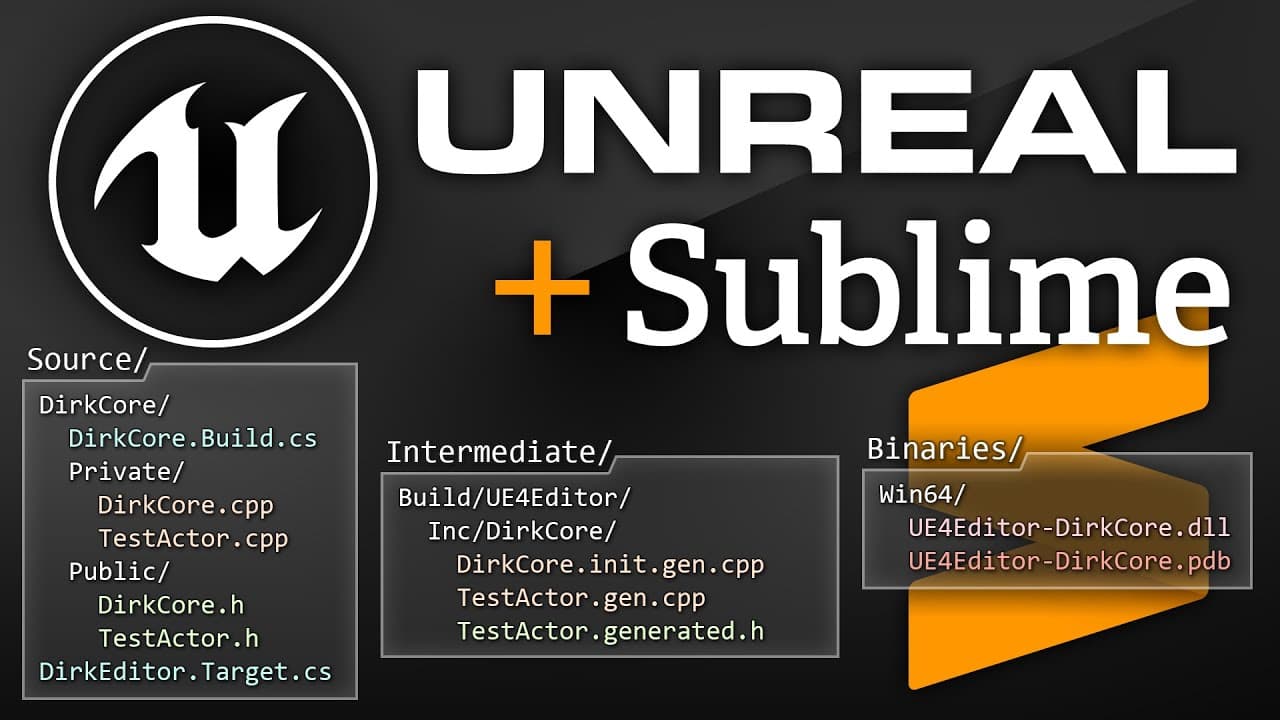
Learn how to create and build an Unreal project from scratch using a text editor and command-line, gaining a deeper understanding of the project structure and build process.
Transcript
You don't need to use Visual Studio to write game code for Unreal. You can generate a solution file, crack it open, and just start writing code. That's the officially supported workflow, after all, and it's a perfectly valid approach. In particular, it's great for beginners since it's an easy way to get started. But I've found it also leads a lot o... Read More
Key Insights
- 🎮 Many developers believe that Visual Studio is the only way to write game code for Unreal, but it is possible to generate a solution file, open it with a text editor, and start writing code.
- 🎓 This approach is great for beginners as it provides an easy way to get started, but it can prevent developers from understanding how an Unreal project fits together and how the build system works.
- ☕ For those who prefer not to use Visual Studio, it is possible to create an Unreal project from scratch using just a text editor and build and run the project from the command line.
- 🔧 The recommended tools for this workflow are Sublime Text 3 as a text editor and Cmder as a terminal, as they are lightweight, customizable, and responsive.
- 🔍 When installing Unreal Engine, developers have the option to clone and build the complete engine source from GitHub or to install a pre-built version using the Epic Games Launcher. The latter is recommended for quick setup.
- 💻 For C++ development in Unreal, it is necessary to install a specific version of Visual Studio, such as Visual Studio 2017, as specified in the release notes of the Unreal version being used.
- 📦 Unreal has its own cross-platform build system, which is invoked by calling the Build.bat file from the command line. This build system is separate from Microsoft's build system used in Visual Studio.
- 🚀 By understanding the build process and creating a streamlined workflow, developers can gain a better understanding of Unreal projects and have more control over their development environment.
Install to Summarize YouTube Videos and Get Transcripts
Explore YouTube Video Summarizer or Get YouTube Transcript Extractor
Questions & Answers
Q: Is it necessary to use Visual Studio for building an Unreal project?
No, it is not necessary to use Visual Studio for building an Unreal project. The video demonstrates an alternative approach using a text editor and command-line.
Q: What are the essential tools needed for building an Unreal project?
The essential tools needed for building an Unreal project include a text editor (e.g., Sublime Text) and a terminal emulator (e.g., Cmder).
Q: What is the purpose of the .uproject file in an Unreal project?
The .uproject file defines the basic details about the project and is used by Unreal Editor to open and load the project.
Q: How can you build an Unreal project from the command-line?
To build an Unreal project from the command-line, you can use the Build.bat file with specific arguments like the target (Editor or Game), platform (Win64), and build configuration (Development).
Q: What is the difference between uncooked and cooked assets in an Unreal project?
Uncooked assets contain the original data in a complete and nondestructive form, while cooked assets are prebuilt for a specific platform, with only the necessary data at runtime (e.g., compressed textures).
Q: How can you navigate and search the Unreal Engine source code in Sublime Text?
You can set up your Sublime Text project with the Engine source directories and use features like Ctrl+P to browse files, Ctrl+Shift+F to search codebase, and Alt+O to switch between header and source files.
Q: What is the purpose of the primary module in an Unreal project?
The primary module is the designated module that the editor loads for the project and contains the core gameplay classes for the project.
Summary & Key Takeaways
-
The video demonstrates an alternative approach to building an Unreal project from scratch using a text editor and command-line instead of Visual Studio.
-
The process involves setting up a clean Windows installation, configuring the OS, installing necessary tools like Sublime Text and Cmder, and installing Unreal Engine from the Epic Games Launcher.
-
The video explains how to create a project directory, set up source modules, define target rules, build the project, and launch the editor or a standalone game instance.
-
The workflow allows for faster iteration and a deeper understanding of the project structure and build system.
Read in Other Languages (beta)
Share This Summary 📚
Summarize YouTube Videos and Get Video Transcripts with 1-Click
Try YouTube Summary with ChatGPT & Claude or YouTube Transcript Generator
Explore More Summaries from Alex Forsythe 📚
Summarize YouTube Videos and Get Video Transcripts with 1-Click
Try YouTube Summary with ChatGPT & Claude or YouTube Transcript Generator