Late night demo/tutorial of MCP!! Using Claude Desktop to auto-organize my files (Setup + Example)
TL;DR
Anthropic's MCP enables AI to manage files efficiently.
Transcript
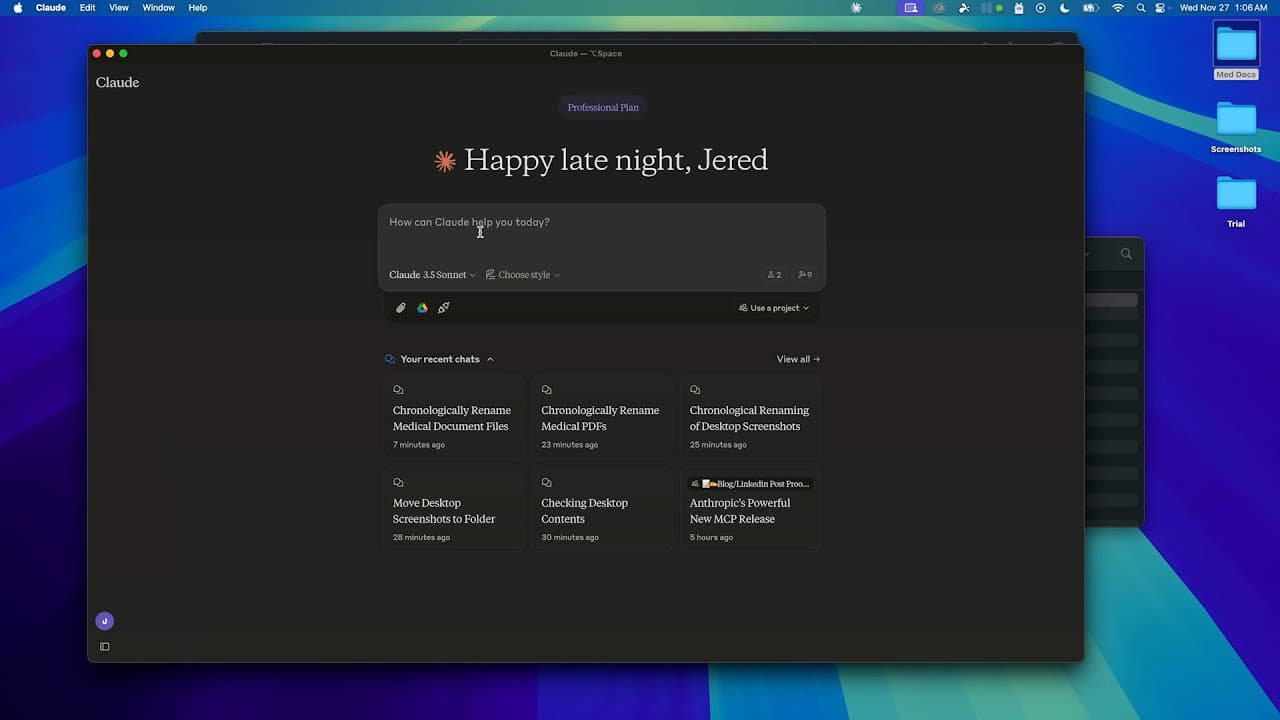
Okay so yesterday anthropic released the model context protocol the mCP which essentially is a way for Claude and really all AI assistants and llms to interact with our data and here they explained that they're open sourcing the mCP a new standard for connecting AI assistance to the systems where data lives including repositories business t... Read More
Key Insights
- Anthropic's Model Context Protocol (MCP) is a new standard designed to connect AI assistants with various data systems, breaking the constraints of data isolation.
- MCP is open-sourced, allowing developers to integrate AI with repositories, business tools, and development environments more efficiently than existing methods.
- The protocol supports local MCP servers via the Claude Desktop app, enabling interaction with local resources and the web.
- MCP currently integrates with systems like Google Drive, Slack, GitHub, and supports operations such as file reading, writing, and directory management.
- A practical demonstration showed MCP's capability to reorganize medical documents chronologically and standardize file naming conventions automatically.
- The setup process involves configuring a JSON file on the Claude Desktop, allowing access to specific directories for file operations.
- MCP is still in beta, and users should proceed with caution, but its potential applications in data management and AI interaction are vast.
- The demo highlighted MCP's ability to correct errors and plan steps autonomously, showcasing its advanced capabilities compared to other AI integration tools.
Install to Summarize YouTube Videos and Get Transcripts
Explore YouTube Video Summarizer or Get YouTube Transcript Extractor
Questions & Answers
Q: What is the Model Context Protocol (MCP) introduced by Anthropic?
The Model Context Protocol (MCP) is a new standard developed by Anthropic to connect AI assistants with various data systems. It aims to overcome the limitations of data isolation by allowing AI to interact with repositories, business tools, and development environments. The protocol is open-source, promoting widespread developer use and integration.
Q: How does the MCP improve AI integration compared to existing methods?
MCP improves AI integration by providing a standardized approach to connect AI assistants with different data systems, eliminating the need for developers to create unique protocols for each tool. This enhances efficiency and broadens the scope of AI applications, allowing for seamless interaction with repositories, business tools, and development environments.
Q: What are some of the systems that MCP currently integrates with?
MCP currently integrates with several systems, including Google Drive, Slack, GitHub, and supports operations on file systems. It allows for tasks such as reading and writing files, managing directories, and interacting with online platforms, showcasing its versatility in handling various data management tasks.
Q: What was demonstrated in the live demo of MCP?
The live demo demonstrated MCP's capability to reorganize medical documents on a local file system. It showcased how the protocol can automatically arrange files in chronological order and standardize file naming conventions, illustrating MCP's practical application in managing and organizing data efficiently.
Q: What is required to set up MCP for file management on Claude Desktop?
Setting up MCP for file management on Claude Desktop involves configuring a JSON file to grant directory access. Users need to add specific configurations to the Claude Desktop config file, allowing the protocol to perform file operations like reading, writing, and managing directories, highlighting its ease of setup and use.
Q: What are the potential applications of MCP beyond file management?
Beyond file management, MCP's potential applications include web scraping, database management, and broader AI data interaction tasks. Its ability to connect AI with various systems and manage data efficiently opens up possibilities for more complex operations and enhanced AI capabilities in different domains.
Q: What precautions should users take when using MCP?
Since MCP is still in beta, users should proceed with caution when using the protocol. It's essential to understand the setup process and potential risks involved in granting access to directories and data systems. Users should ensure they have adequate backups and security measures in place when experimenting with MCP.
Q: How does MCP compare to other AI integration tools like ChatGPT?
MCP offers a different approach compared to tools like ChatGPT by providing a standardized protocol for AI integration with data systems. While ChatGPT focuses on text-based interactions, MCP enables broader data management tasks and direct interaction with file systems, offering a more comprehensive solution for AI data integration.
Summary & Key Takeaways
-
Anthropic's Model Context Protocol (MCP) aims to revolutionize AI integration by connecting AI assistants to various data systems, overcoming current data isolation issues. The protocol is open-source, promoting widespread developer adoption and enabling efficient interaction with repositories, business tools, and development environments.
-
The MCP allows running local servers via the Claude Desktop app, facilitating interactions with local resources and online platforms. The protocol supports integrations with Google Drive, Slack, GitHub, and more, enabling comprehensive data management tasks like file reading, writing, and directory operations.
-
A live demo showcased MCP's practical application in organizing medical documents by date and standardizing file names. The setup involves configuring a JSON file on Claude Desktop to grant directory access, illustrating MCP's potential to transform AI data interaction despite being in beta.
Read in Other Languages (beta)
Share This Summary 📚
Summarize YouTube Videos and Get Video Transcripts with 1-Click
Try YouTube Summary with ChatGPT & Claude or YouTube Transcript Generator
Explore More Summaries from JeredBlu 📚
Summarize YouTube Videos and Get Video Transcripts with 1-Click
Try YouTube Summary with ChatGPT & Claude or YouTube Transcript Generator