Products
Features
YouTube Video Summarizer
Summarize YouTube videos
Web & PDF Highlighter
Highlight web pages & PDFs
Chat with PDF
Ask any PDF questions with AI
Ask AI Clone
Chat with your highlights & memories
Audio Transcriber
Transcribe audio files to text
Glasp Reader
Read and highlight articles
Kindle Highlight Export
Export your Kindle highlights
Idea Hatch
Hatch ideas from your highlights
Integrations
Obsidian Plugin
Notion Integration
Pocket Integration
Instapaper Integration
Medium Integration
Readwise Integration
Snipd Integration
Hypothesis Integration
Apps & Extensions
Chrome Extension
Safari Extension
Edge Add-ons
Firefox Add-ons
iOS App
Android App
Discover
Discover
Ideas
Discover new ideas and insights
Articles
Curated articles and insights
Books
Book recommendations by great minds
Posts
Essays and notes from readers
Quotes
Inspiring quotes collection
Videos
Curated videos and summaries
Explore Glasp
Glasp Newsletter
Weekly insights and updates
Glasp Talk
Interview series with great minds
Glasp Blog
Latest news and articles
Glasp Use Cases
Learn how others use Glasp
Build & Support
Glasp API
Access Glasp's API for developers
MCP Connector
Connect Glasp to Claude & ChatGPT
Community
Glasp Reddit Community
Students
Student discount and benefits
FAQs
Frequently Asked Questions
AboutPricing
DashboardLog inSign up

Data Visualization with Nicholas Felton Using Processing
15.7K views
•
February 3, 2015
by
Skillshare
YouTube video player
Data Visualization with Nicholas Felton Using Processing

TL;DR

Learn how to import and process CSV data in Processing to position markers on a map.

Transcript

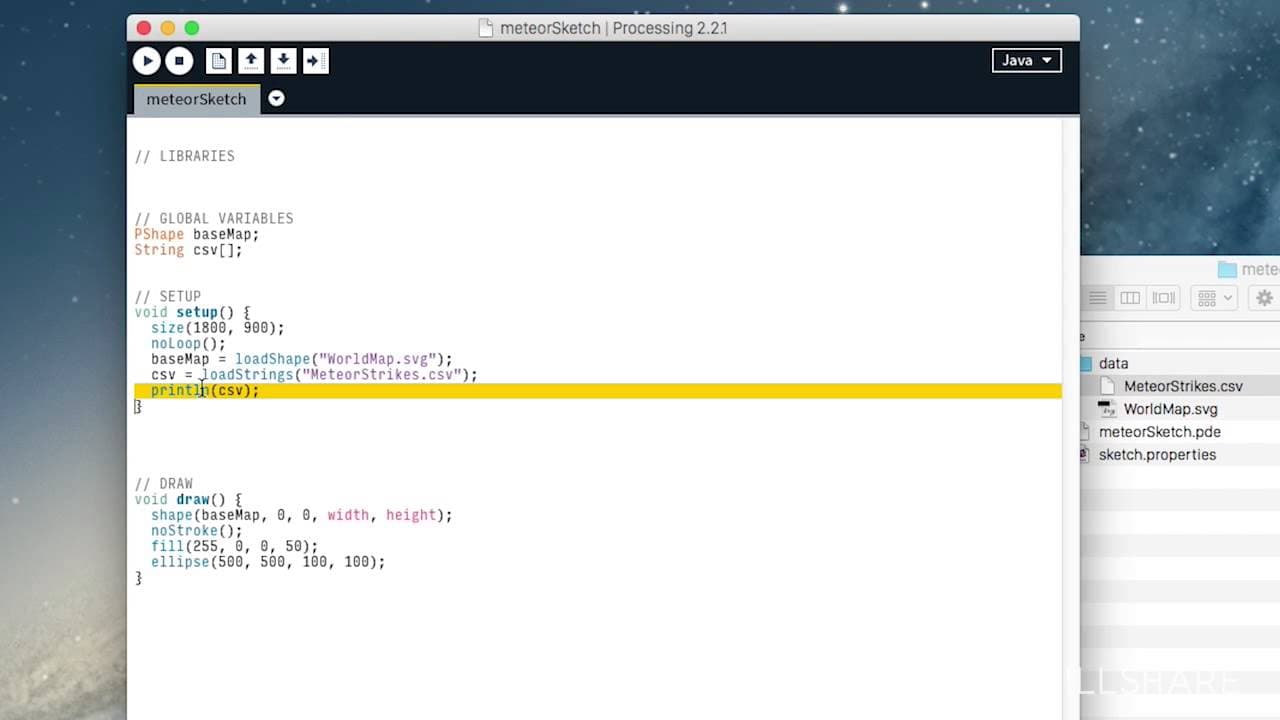
for this next section we're going to bring in the CSV data into a 2d array so that we can process it and place our markers in the right position on the map now we're going to use a bit of repetitive code to parse this CSV into our arrays um I'm going to do a little bit of setup but this piece of code that we copy over is just something that you'll ... Read More

Key Insights

  • ♿ CSV data can be imported into a 2D array in Processing to efficiently process and access specific data elements.
  • 📁 The loadStrings function is used to bring in data from a text file in Processing.
  • 👻 Splitting the CSV data on commas allows for easy access to individual data elements.
  • 🤨 The size of the 2D array can be determined based on the number of rows in the CSV data.
  • 🫥 Reusable code can be used to split CSV lines into the 2D array for further processing.
  • 👣 Printing specific data elements from the 2D array can verify the correctness of the import and splitting process.
  • 🧘 The imported CSV data can be used for positioning markers on a map in a Processing project.

Install to Summarize YouTube Videos and Get Transcripts

Explore YouTube Video Summarizer or Get YouTube Transcript Extractor

Questions & Answers

Q: What is the purpose of importing CSV data into a 2D array in Processing?

Importing CSV data into a 2D array allows us to efficiently access and process specific data elements for positioning markers on a map.

Q: What function is used to load strings from a text file in Processing?

The loadStrings function is used to import data from a text file in Processing.

Q: How can we access a specific line of data from the loaded CSV in Processing?

We can access a specific line of data from the loaded CSV by using the CSV array and specifying the line number within square brackets, e.g., CSV[23].

Q: How do we split the CSV data into rows and columns?

The CSV data can be split into rows and columns by using the split function in Processing and specifying the delimiter, which is a comma in this case.

Summary & Key Takeaways

  • The content explains how to import CSV data into a 2D array using Processing to place markers on a map.

  • It covers setting up a variable for the CSV content, loading the strings from the text file, and printing the loaded CSV content in the console.

  • The tutorial also covers splitting the CSV data into rows and columns to access specific data elements.


Read in Other Languages (beta)

English

Share This Summary 📚

Summarize YouTube Videos and Get Video Transcripts with 1-Click

Download browser extensions on:

Try YouTube Summary with ChatGPT & Claude or YouTube Transcript Generator

Explore More Summaries from Skillshare 📚

JPEG vs. RAW Comparison for Photo Editing in Lightroom thumbnail
JPEG vs. RAW Comparison for Photo Editing in Lightroom
Skillshare
trashhand Demonstrates How He Finds Lighting When Photographing Cityscapes thumbnail
trashhand Demonstrates How He Finds Lighting When Photographing Cityscapes
Skillshare
Shooting Complementary Colors and Light Sources with Steve Sweatpants thumbnail
Shooting Complementary Colors and Light Sources with Steve Sweatpants
Skillshare
How to Make a Dried Flower Bouquet thumbnail
How to Make a Dried Flower Bouquet
Skillshare
What to Look For When Buying Fish for Sushi and Ceviche thumbnail
What to Look For When Buying Fish for Sushi and Ceviche
Skillshare
What Is Web 3.0? Learn with pplpleasr thumbnail
What Is Web 3.0? Learn with pplpleasr
Skillshare

Summarize YouTube Videos and Get Video Transcripts with 1-Click

Download browser extensions on:

Try YouTube Summary with ChatGPT & Claude or YouTube Transcript Generator

Apps & Extensions

  • Chrome Extension
  • Safari Extension
  • Edge Add-ons
  • Firefox Add-ons
  • iOS App
  • Android App

Key Features

  • YouTube Video Summarizer
  • Web & PDF Summarizer
  • Web & PDF Highlighter
  • Chat with PDF
  • Ask AI Clone
  • Audio Transcriber
  • Glasp Reader
  • Kindle Highlight Export
  • Idea Hatch

Integrations

  • Obsidian Plugin
  • Notion Integration
  • Pocket Integration
  • Instapaper Integration
  • Medium Integration
  • Readwise Integration
  • Snipd Integration
  • Hypothesis Integration

More Features

  • APIs
  • MCP Connector
  • Blog & Post
  • Embed Links
  • Image Highlight
  • Personality Test
  • Quote Shots

Company

  • About us
  • Blog
  • Community
  • FAQs
  • Job Board
  • Newsletter
  • Pricing
Terms

•

Privacy

•

Guidelines

© 2026 Glasp Inc. All rights reserved.