Build and Deploy a React Admin Dashboard With Real time Data, Charts, Events, Kanban, CRM, and More
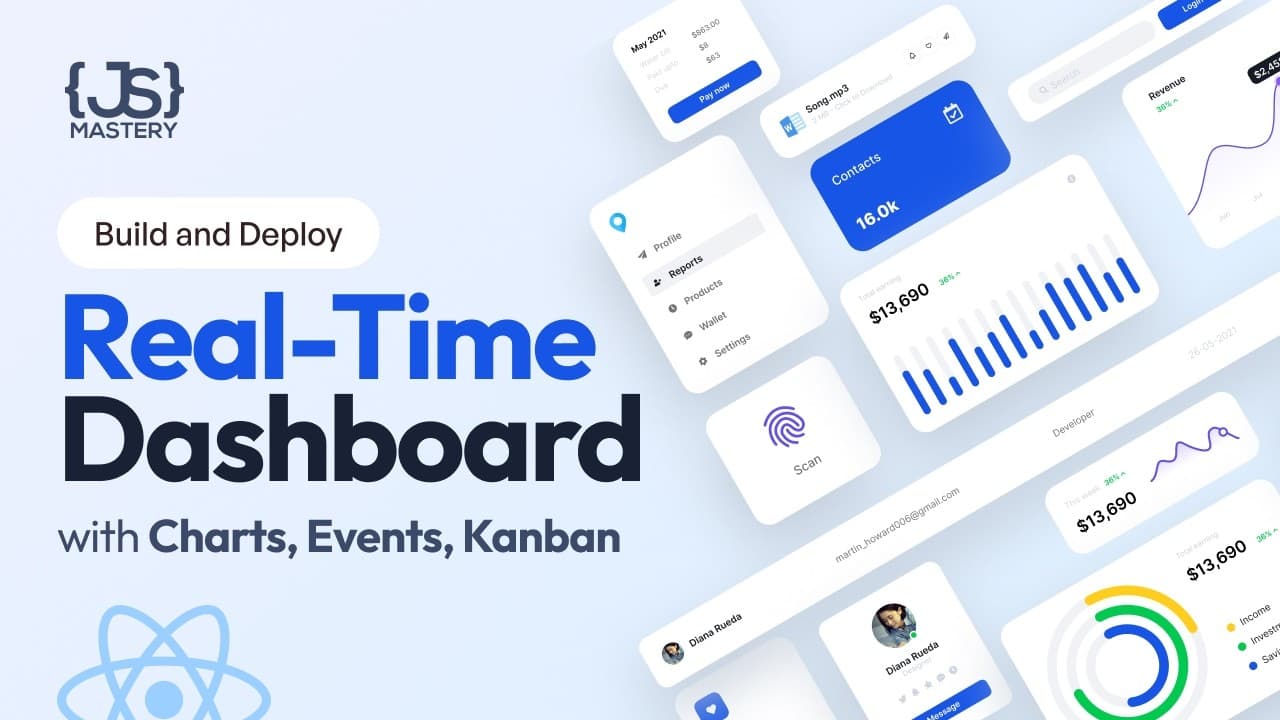
TL;DR
Learn to build a real-time React admin dashboard with CRUD operations.
Transcript
do you want to develop a react admin dashboard that updates in real time across devices hi there and welcome to another Project based tutorial where you'll build an admin dashboard with full authentication including forgotten password a homepage showcasing charts upcoming events and latest activities a comprehensive table for companies with... Read More
Key Insights
- The tutorial guides on creating an admin dashboard using React, GraphQL, and TypeScript, focusing on real-time data synchronization.
- It covers implementing full authentication, including login, registration, and password recovery, using a custom authentication provider.
- The dashboard includes features like a homepage with charts, upcoming events, and latest activities, all synchronized in real time.
- A comprehensive table for managing companies is built, supporting full CRUD operations and search capabilities.
- A Kanban board is implemented for task management, allowing drag-and-drop functionality and real-time updates across devices.
- The tutorial demonstrates using Refine Framework to streamline development, providing hooks and components for common functionalities.
- GraphQL queries and mutations are used extensively to fetch and manipulate data, with TypeScript ensuring type safety.
- The project setup includes configuring data and live providers for seamless integration with GraphQL APIs and WebSocket for real-time updates.
Install to Summarize YouTube Videos and Get Transcripts
Explore YouTube Video Summarizer or Get YouTube Transcript Extractor
Questions & Answers
Q: How does the tutorial handle real-time data synchronization?
The tutorial uses Refine Framework's live provider to enable real-time data synchronization. It sets up a WebSocket client using GraphQL WS to listen for data changes. This allows the dashboard to update instantly across devices without manual refreshing, ensuring efficient and seamless data management.
Q: What authentication features are implemented in the dashboard?
The dashboard includes full authentication features such as login, registration, and password recovery. A custom authentication provider is created to manage user sessions and permissions. The tutorial shows how to integrate authentication logic using GraphQL mutations for login and user management, ensuring secure access control.
Q: What tools and libraries are used in the project setup?
The project setup utilizes several modern tools and libraries, including React for building the user interface, GraphQL for data queries and mutations, and TypeScript for type safety. Refine Framework is used extensively to simplify development, providing built-in hooks and components for common functionalities like data fetching, authentication, and routing.
Q: How are CRUD operations implemented for company management?
CRUD operations for company management are implemented using Refine Framework's resource and list concepts. The tutorial sets up GraphQL queries and mutations to handle data fetching and manipulation. The company management table supports creating, reading, updating, and deleting companies, with search capabilities for efficient data management.
Q: What is the role of GraphQL in the dashboard?
GraphQL plays a crucial role in the dashboard by providing a flexible and efficient way to fetch and manipulate data. The tutorial demonstrates how to use GraphQL queries and mutations to interact with the backend, ensuring that only the necessary data is retrieved. This approach optimizes performance and simplifies data management.
Q: How is the Kanban board implemented and what features does it offer?
The Kanban board is implemented using a component-based approach, allowing tasks to be managed in a Trello-like interface. It supports drag-and-drop functionality for task organization and real-time updates across devices. The board allows creating, editing, and deleting tasks, with the ability to assign multiple users and set deadlines.
Q: What are the benefits of using Refine Framework in this project?
Refine Framework offers several benefits, including faster development through ready-to-use hooks and components. It simplifies common tasks like data fetching, authentication, and routing, allowing developers to focus on business logic. Refine's modern architecture and integration with GraphQL and TypeScript enhance efficiency and maintainability.
Q: How does the tutorial ensure type safety in the project?
Type safety is ensured through the use of TypeScript, which provides static typing and helps catch errors during development. The tutorial uses GraphQL Code Generator to automatically generate TypeScript types from GraphQL schemas, ensuring that data structures are consistent and reducing the likelihood of runtime errors.
Summary & Key Takeaways
-
This tutorial teaches how to build a React admin dashboard with real-time data updates using Refine Framework. It includes implementing authentication, a homepage with charts and activities, and a company management table with CRUD operations.
-
The dashboard also features a Kanban board for tasks, supporting drag-and-drop and real-time synchronization. The project uses GraphQL for data fetching and TypeScript for type safety, with Refine Framework simplifying common tasks.
-
Comprehensive setup instructions are provided, including data and live provider configuration, authentication setup, and route management. The tutorial emphasizes efficient development practices using modern tools and libraries.
Read in Other Languages (beta)
Share This Summary 📚
Summarize YouTube Videos and Get Video Transcripts with 1-Click
Try YouTube Summary with ChatGPT & Claude or YouTube Transcript Generator
Explore More Summaries from JavaScript Mastery 📚



Summarize YouTube Videos and Get Video Transcripts with 1-Click
Try YouTube Summary with ChatGPT & Claude or YouTube Transcript Generator