What Are Data Hazards in Pipelined CPUs?
TL;DR
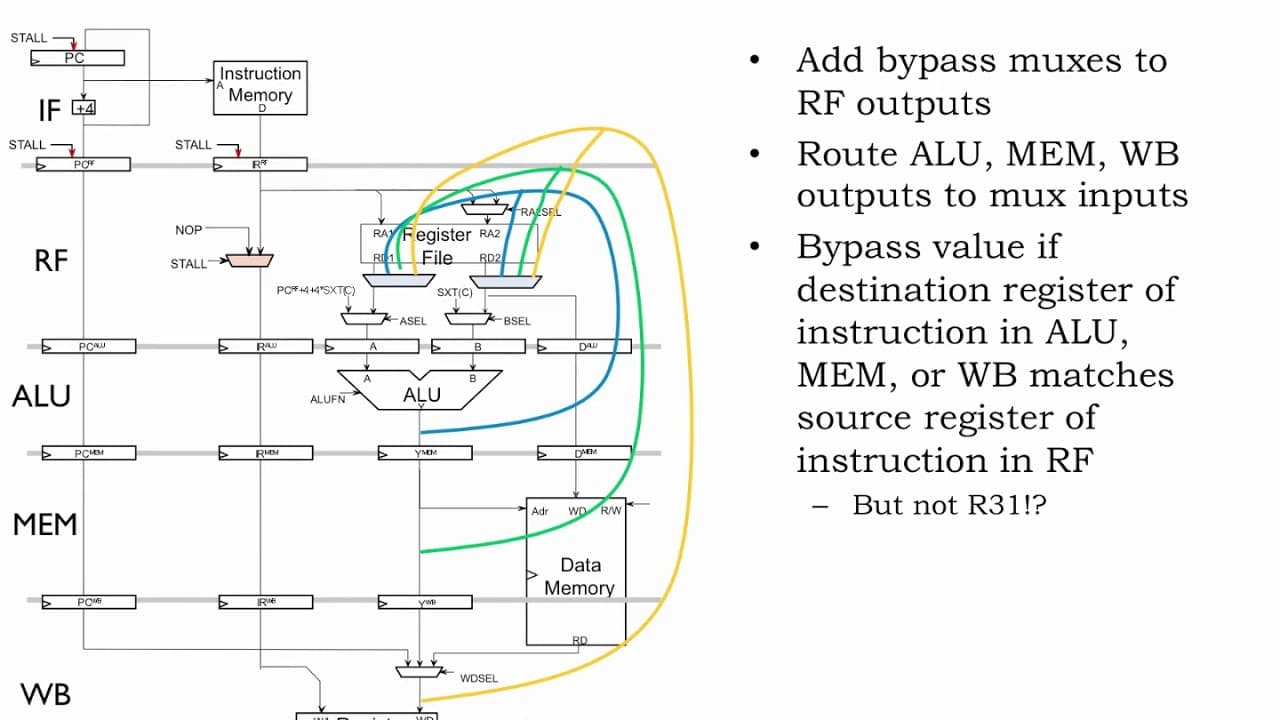
Data hazards occur in pipelined CPUs when one instruction relies on the result of a preceding instruction that hasn't yet updated the register file. They can be addressed through three strategies: stalling the pipeline until the data is available, bypassing the needed value from another pipeline stage, or speculation based on educated guesses. Each approach has its trade-offs with respect to instruction throughput and complexity.
Transcript
The data path diagram isn't all that useful in diagramming the pipelined execution of an instruction sequence since we need a new copy of the diagram for each clock cycle. A more compact and easier-to-read diagram of pipelined execution is provided by the pipeline diagrams we met back in Part 1 of the course. There's one row in the diagram for each... Read More
Key Insights
- ❓ Pipeline diagrams provide a more concise and readable representation of pipelined execution compared to traditional data path diagrams.
- 👻 Stalling involves delaying instructions until the required data is available in the register file, while bypassing allows routing data from other pipeline stages.
- 🪡 Compiler optimizations can reduce dependencies and minimize the need for stalls in pipelined execution.
- ⏰ Adding more pipeline stages can decrease the clock period but increases the likelihood of data hazards and stalls.
Install to Summarize YouTube Videos and Get Transcripts
Explore YouTube Video Summarizer or Get YouTube Transcript Extractor
Questions & Answers
Q: What is the purpose of using pipeline diagrams in understanding pipelined execution?
Pipeline diagrams provide a more concise and readable representation of pipelined execution compared to traditional data path diagrams. Each row represents a pipeline stage, and each column represents a cycle of execution, showing which instruction is in each stage at each cycle.
Q: When are register reads and writes performed for a particular instruction?
Register reads happen during the RF (Register File) stage when the instruction's register operands are read. Register writes occur at the end of the cycle when the instruction is in the WB (Write Back) stage.
Q: What is a data hazard?
A data hazard occurs when an instruction depends on the result of a previous instruction that has not yet been written to the register file. This can lead to incorrect execution if not handled properly.
Q: How does stalling address data hazards?
Stalling involves delaying the execution of instructions in the RF stage until the required data is available in the register file. This ensures correct execution but reduces instruction throughput.
Q: What is bypassing?
Bypassing, also known as forwarding, allows routing the needed data from other pipeline stages to the RF stage, eliminating or reducing the need for stalling. It can improve instruction throughput by avoiding unnecessary delays.
Q: How can compilers help mitigate data hazards?
Compilers can reorganize the assembly language code to minimize dependencies between instructions. By moving independent instructions before dependent ones, the need for stalls can be reduced or eliminated.
Q: Can adding more pipeline stages reduce the clock period?
Adding more pipeline stages can decrease the clock period, but it also increases the chances of data hazards and the need for stalling, resulting in a higher CPI (Cycles Per Instruction).
Q: What is the potential tradeoff of changing the ISA to handle data hazards?
Changing the ISA to include data hazards as part of the design simplifies the hardware, but it puts the burden on compilers and assembly language programmers. It may not be a favorable approach due to the long lifetimes of successful ISAs.
Summary & Key Takeaways
-
The traditional data path diagram is not helpful for visualizing pipelined execution. Pipeline diagrams with rows for each stage and columns for each cycle provide a more compact and readable representation.
-
Data hazards occur when one instruction depends on the result of a previous instruction that has not been written to the register file yet. Strategies like stalling, bypassing, and speculation can be used to handle data hazards.
-
Stalling involves waiting for the required data to be available in the register file, but it decreases instruction throughput.
-
Bypassing allows routing the needed data from other pipeline stages, reducing or eliminating the need for stalling. However, load-to-use hazards may still require stalling.
-
Compiler optimizations can help reduce dependencies and minimize the need for stalls.
-
Changing the Instruction Set Architecture (ISA) to include data hazards as part of the design is another approach, but it can complicate the work of compilers and assembly language programmers.
Read in Other Languages (beta)
Share This Summary 📚
Summarize YouTube Videos and Get Video Transcripts with 1-Click
Try YouTube Summary with ChatGPT & Claude or YouTube Transcript Generator
Explore More Summaries from MIT OpenCourseWare 📚


Summarize YouTube Videos and Get Video Transcripts with 1-Click
Try YouTube Summary with ChatGPT & Claude or YouTube Transcript Generator