Subtitle CC✔️ ChatGPT New Feature - Canvas!
TL;DR
ChatGPT's Canvas offers AI-powered text editing capabilities.
Transcript
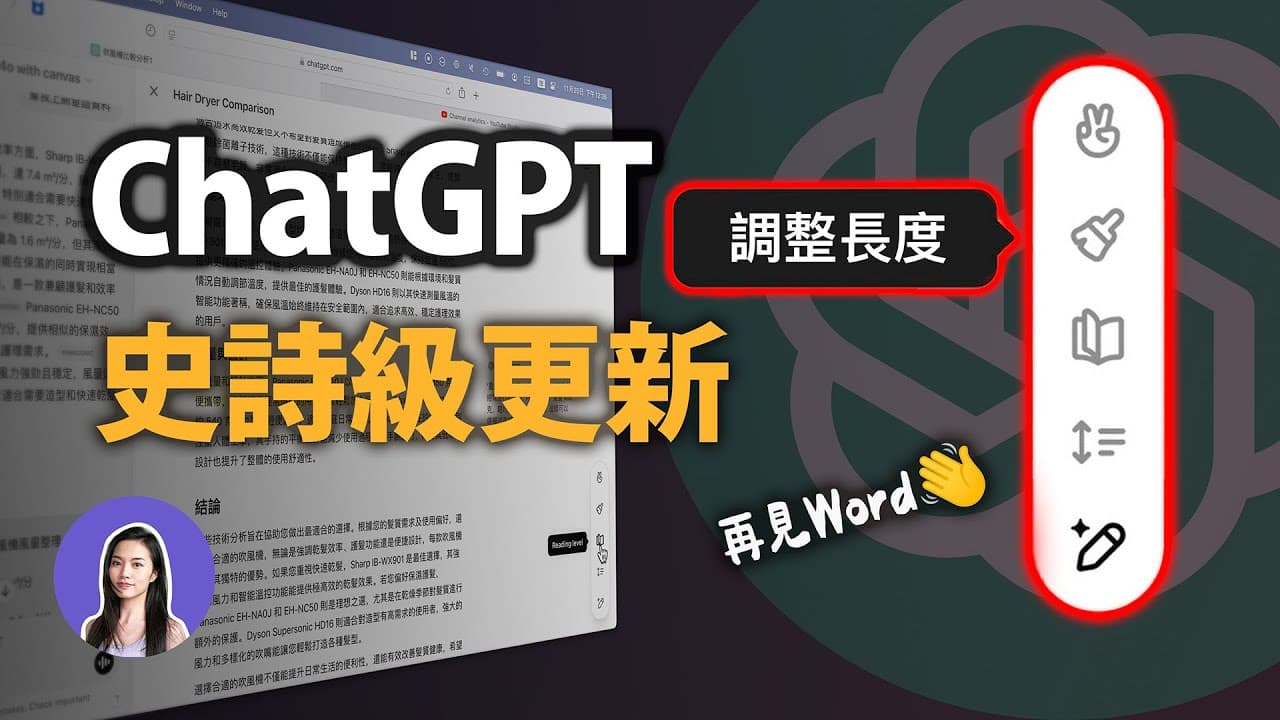
ChatGPT launched the new feature Canvas last month. I really can’t believe it. I just started using it recently because I didn’t know how to use it. It’s really amazing. So what exactly is Canvas? To put it simply, it is AI combined with text editing. Now let 's directly look at what's inside the window. It's ChatGPT. Isn&am... Read More
Key Insights
- Canvas is a new feature in ChatGPT that combines AI with text editing, allowing users to modify documents directly within the ChatGPT interface.
- The feature is currently only available to paying users, but there are plans to make it accessible to free users in the future.
- Canvas addresses two major pain points of traditional ChatGPT: short responses and inability to partially edit documents without disrupting the entire content.
- The interface allows for two main editing methods: modifying content through the dialog box or typing directly in the text editor.
- Canvas includes a visual interface that provides ready-made functions for document formatting, making it easier to manage titles, subtitles, and key points.
- In addition to document editing, Canvas also supports programming, offering features like debugging, adding comments, and switching programming languages.
- Despite its advantages, Canvas can sometimes make unwanted changes to documents, highlighting the need for precise instructions and adaptation to its understanding.
- The feature is still in beta, with potential improvements expected, especially in its ability to understand and execute commands accurately.
Install to Summarize YouTube Videos and Get Transcripts
Explore YouTube Video Summarizer or Get YouTube Transcript Extractor
Questions & Answers
Q: What is ChatGPT's Canvas feature?
Canvas is a new feature in ChatGPT that combines AI with text editing, allowing users to modify documents directly within the ChatGPT interface. It provides a more flexible and efficient way to edit text, addressing previous limitations such as short responses and the inability to partially edit documents.
Q: Who can currently access the Canvas feature?
As of now, the Canvas feature is only available to paying users of ChatGPT. However, there are plans to make it accessible to free users in the future, allowing a broader audience to benefit from its advanced text editing capabilities.
Q: What are the main editing methods available in Canvas?
Canvas offers two main editing methods: users can modify content through the dialog box on the left side of the interface or type directly in the text editor on the right side. This flexibility allows for both guided AI-assisted edits and manual input, catering to different user preferences.
Q: How does Canvas improve document formatting?
Canvas includes a visual interface with ready-made functions for document formatting. Users can easily manage titles, subtitles, and key points without manually inputting them. This streamlines the editing process, making it more efficient and reducing the need for extensive manual adjustments.
Q: Does Canvas support programming tasks?
Yes, Canvas supports programming tasks by offering features like debugging, adding comments, and switching programming languages. This makes it a versatile tool not only for text editing but also for coding, catering to a wide range of user needs within the ChatGPT interface.
Q: What are some challenges associated with using Canvas?
While Canvas offers many advantages, it can sometimes make unwanted changes to documents, requiring users to be precise with their instructions. This highlights the need for users to adapt to its understanding and execution of commands, as it may not always interpret requests accurately.
Q: What improvements are expected for the Canvas feature?
As the Canvas feature is still in beta, there are expectations for improvements in its ability to understand and execute commands accurately. Future updates may enhance its functionality, making it more user-friendly and effective in addressing the needs of both text editing and programming tasks.
Q: How does Canvas handle document readability and length adjustments?
Canvas allows users to adjust document readability levels and length, providing options to tailor content for different audiences. Users can choose between formal and informal styles and adjust the length to include more or fewer details, making it adaptable to various writing needs and preferences.
Summary & Key Takeaways
-
ChatGPT's new Canvas feature enhances text editing by integrating AI, allowing users to modify documents directly within the interface. It addresses issues of short responses and partial editing, offering a more convenient solution compared to traditional methods.
-
Currently available to paying users, Canvas provides a visual interface with functions for document formatting and programming support. It includes features like debugging and language switching, although it may still make unwanted changes.
-
The feature is in beta, with improvements anticipated in its command understanding and execution. Users are encouraged to adapt to its functionality, with hopes for broader integration and future accessibility for free users.
Read in Other Languages (beta)
Share This Summary 📚
Summarize YouTube Videos and Get Video Transcripts with 1-Click
Try YouTube Summary with ChatGPT & Claude or YouTube Transcript Generator
Explore More Summaries from 蘋果妹 📚
Summarize YouTube Videos and Get Video Transcripts with 1-Click
Try YouTube Summary with ChatGPT & Claude or YouTube Transcript Generator