How to Create a Line Plot for Crime Trends in R
TL;DR
To create a line plot for visualizing crime trends in R, first read the data using read.csv and convert the Date variable for correct formatting. Use ggplot2 to plot total crimes by day of the week, ensuring the days are ordered chronologically by setting the Weekday variable as an ordered factor. Finally, label the axes for clarity.
Transcript
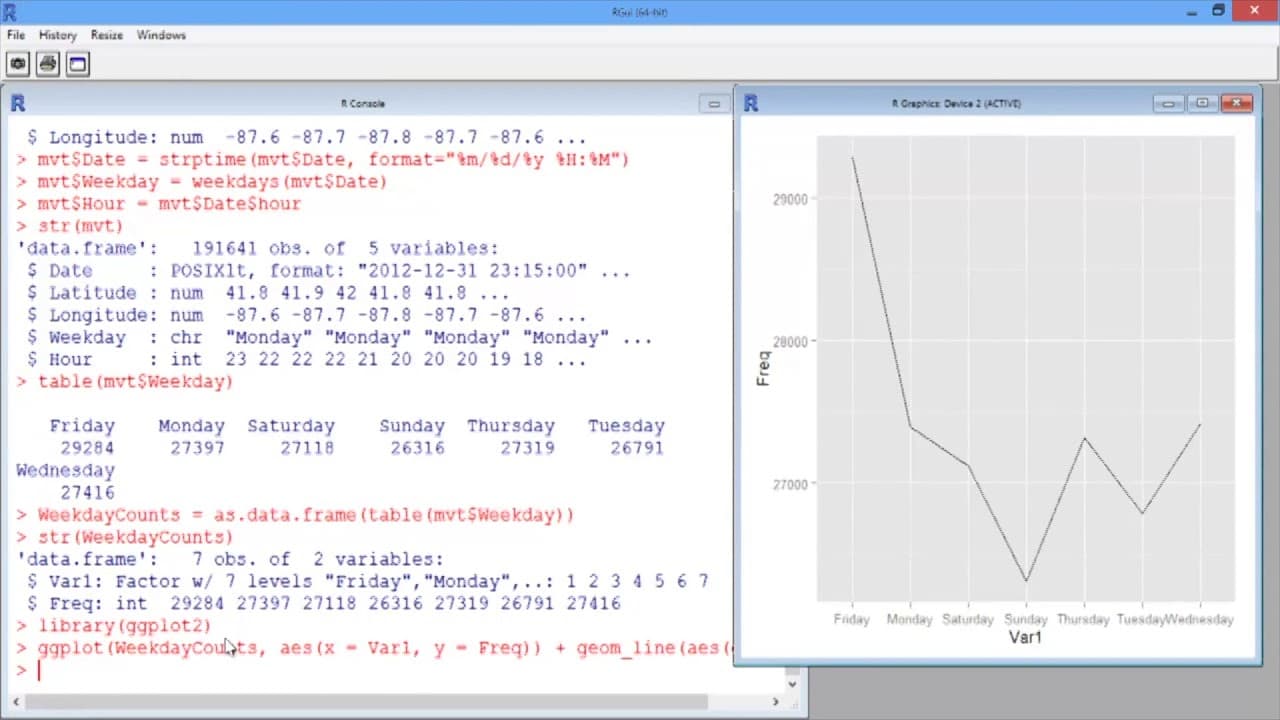
In this video, we'll create a basic line plot to visualize crime trends. Let's start by reading in our data. We'll call it mvt for motor vehicle thefts, and use the read.csv function to read in the file mvt.csv. We'll add the argument stringsAsFactors = FALSE, since we have a text field, and we want to make sure it's read in properly. Let's take a ... Read More
Key Insights
- 🤩 R's str function helps understand the structure of the data, including the number of observations and variables.
- 📦 The ggplot2 package is required for creating visualizations in R.
- 🧑🏭 Using the factor function with ordered = TRUE ensures the desired ordering of categorical variables in a plot.
- 💱 Changing x and y-axis labels can improve the interpretability of a visualization.
Install to Summarize YouTube Videos and Get Transcripts
Explore YouTube Video Summarizer or Get YouTube Transcript Extractor
Questions & Answers
Q: How does the video suggest reading in the data file?
The video suggests using the read.csv function and adding the argument stringsAsFactors = FALSE to ensure proper reading of the text field.
Q: How is the date variable converted to a recognizable format?
The strptime function is used, with the specified format "%m/%d/%y %H:%M".
Q: How are the variables for day of the week and hour extracted and added to the data frame?
The weekdays and hour functions are used, and the extracted values are assigned to new variables using the mvt$Weekday and mvt$Hour syntax.
Q: How is the line plot created?
The ggplot function is used, with the WeekdayCounts data frame specified as the data. The aesthetic is defined with x = Var1 representing the day of the week and y = Freq representing the frequency of crimes. The geom_line function is added with aes(group=1) to create one line in the plot.
Summary & Key Takeaways
-
The video starts by reading in data on motor vehicle thefts and analyzing its structure.
-
The date variable is converted to a format that R recognizes, allowing for the extraction of the day of the week and hour of the day.
-
Line plots are then created to display the total number of crimes by day of the week, with days ordered chronologically.
Read in Other Languages (beta)
Share This Summary 📚
Summarize YouTube Videos and Get Video Transcripts with 1-Click
Try YouTube Summary with ChatGPT & Claude or YouTube Transcript Generator
Explore More Summaries from MIT OpenCourseWare 📚
Summarize YouTube Videos and Get Video Transcripts with 1-Click
Try YouTube Summary with ChatGPT & Claude or YouTube Transcript Generator