How to Upgrade Your Desk for Better Focus
TL;DR
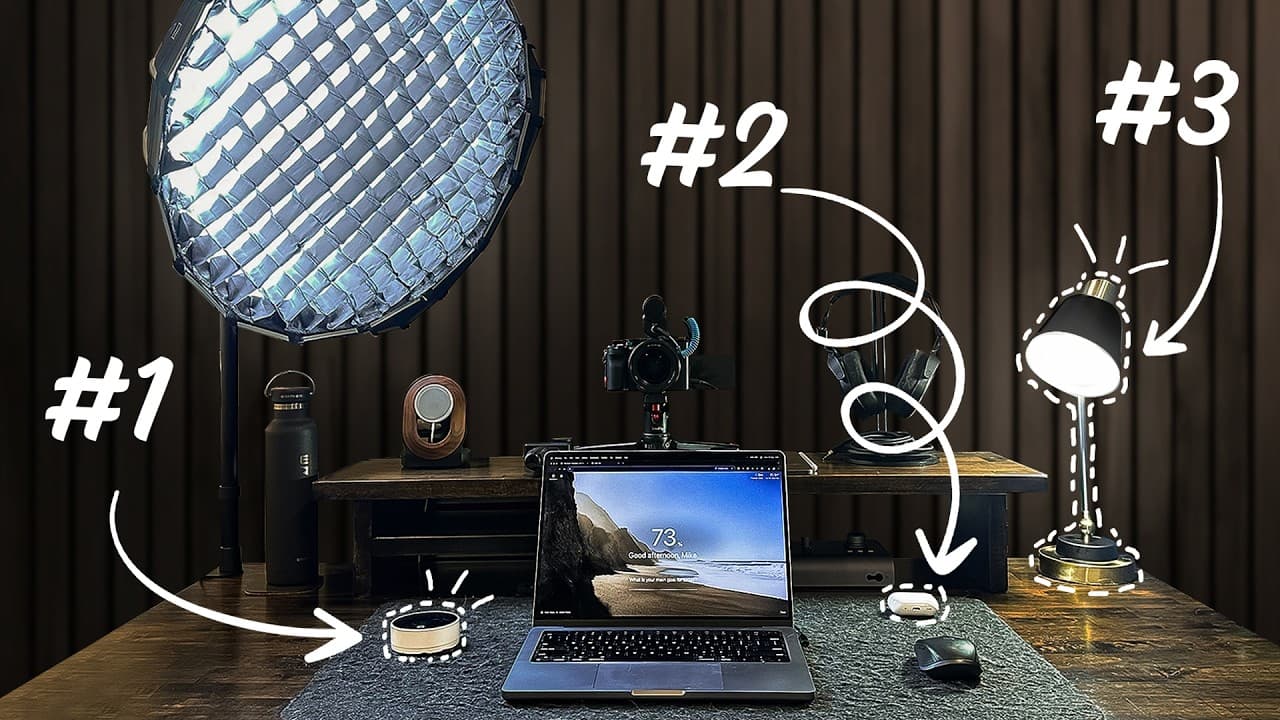
To enhance focus during work, integrate productivity tools like Opal for distraction management, a study lamp for concentration, and a timer for structured work sessions. Utilize a standing desk for health benefits and incorporate a laptop with minimal accessories for mobility. These upgrades can significantly boost productivity.
Transcript
this right here is where I spend the vast majority of my workday so naturally I have some productivity devices that make me significantly more productive such as this little timer here and these are the devices that I'm going to go through in this video your phone can be a procrastination device or a productivity device depending on how you use it ... Read More
Key Insights
- Opal is an app that blocks distracting apps on your phone and computer, aiding focus.
- A study lamp can enhance concentration by signaling your brain to enter focus mode.
- Using a single laptop screen can prevent the inefficiencies of multitasking.
- A dedicated timer, like the Pomodoro technique, can create urgency and improve task completion.
- Active noise-canceling earphones, such as AirPods, are vital in noisy environments for maintaining focus.
- A water bottle on your desk is crucial for staying hydrated and maintaining energy levels.
- A MagSafe stand ensures your phone stays charged, preventing interruptions due to low battery.
- A standing desk offers health benefits and allows for movement during long work hours.
Install to Summarize YouTube Videos and Get Transcripts
Explore YouTube Video Summarizer or Get YouTube Transcript Extractor
Questions & Answers
Q: How does Opal help improve focus?
Opal is an app designed to block distracting apps on both your phone and computer during designated focus times. By preventing access to social media and other non-essential applications, Opal helps users maintain concentration on their tasks, thereby improving productivity and reducing time lost to distractions.
Q: What is the benefit of using a study lamp for concentration?
A study lamp can enhance concentration by creating a consistent environment associated with focus. Turning on the lamp signals your brain to enter a work mode, similar to the effect of being in a library. This environmental cue helps reinforce the habit of concentrating whenever the lamp is on.
Q: Why is using a single laptop screen more productive than multiple monitors?
Using a single laptop screen can be more productive because it reduces the temptation to multitask, which has been shown to be inefficient. Focusing on one task at a time with a single screen helps maintain concentration and prevents the cognitive overload associated with managing multiple displays.
Q: How does a timer improve work productivity?
A timer, such as those used with the Pomodoro technique, improves productivity by creating a sense of urgency and structuring work sessions. By setting a timer for a specific period, like 40 minutes, and taking regular breaks, you can maintain focus, reduce burnout, and increase task completion efficiency.
Q: What role do noise-canceling earphones play in productivity?
Noise-canceling earphones, like AirPods, are crucial for productivity in noisy environments, such as coffee shops. They help block out background noise, allowing you to maintain focus on your work. This is especially important for tasks requiring deep concentration, as it minimizes auditory distractions.
Q: Why is staying hydrated important for productivity?
Staying hydrated is essential for productivity because dehydration can lead to fatigue and decreased cognitive function. Having a water bottle on your desk encourages regular water intake, helping maintain energy levels and mental clarity throughout the day, which is vital for sustained focus and performance.
Q: How does a MagSafe stand contribute to productivity?
A MagSafe stand contributes to productivity by ensuring your phone remains charged and accessible without interrupting your workflow. By keeping your phone charged, you avoid the distraction and inconvenience of a low battery, allowing you to focus on tasks without worrying about your phone dying during important work.
Q: What are the benefits of using a standing desk?
A standing desk offers numerous benefits for productivity and health. It allows you to alternate between sitting and standing, reducing the risks associated with prolonged sitting, such as back pain. Standing can also increase energy levels and improve posture, which can enhance focus and overall work performance.
Summary & Key Takeaways
-
Opal is a productivity app that blocks distracting apps during work hours, helping maintain focus. A study lamp can signal your brain to enter concentration mode, similar to being in a library. Using a single laptop screen instead of multiple monitors can prevent multitasking inefficiencies.
-
A dedicated timer, such as the Pomodoro technique, helps create urgency and improve task completion by structuring work sessions. Active noise-canceling earphones, like AirPods, are essential in noisy environments to maintain focus.
-
A water bottle on your desk is crucial for staying hydrated and maintaining energy levels, while a MagSafe stand keeps your phone charged, preventing interruptions. A standing desk offers health benefits and allows for movement during long work hours.
Read in Other Languages (beta)
Share This Summary 📚
Summarize YouTube Videos and Get Video Transcripts with 1-Click
Try YouTube Summary with ChatGPT & Claude or YouTube Transcript Generator
Explore More Summaries from Mike Dee 📚

Summarize YouTube Videos and Get Video Transcripts with 1-Click
Try YouTube Summary with ChatGPT & Claude or YouTube Transcript Generator