How to Perform DLL Injection in Processes
TL;DR
DLL injection is a technique used to insert malicious code into a legitimate process's memory space, allowing the code to execute within the context of that process. This method is often used for defense evasion and privilege escalation. The process involves identifying a target process, allocating memory, and using specific APIs to inject and execute the malicious DLL.
Transcript
hey guys so as discussed today i'm going to take you through the process injection method and specifically the dll injection technique which is a very common one so let's start from taking a look at the mitre framework we can see different tactics along with optional techniques that attackers are using one of the common techniques is called process... Read More
Key Insights
- DLL injection is a process injection technique used to execute malicious code within a legitimate process's memory space.
- The technique is commonly used for defense evasion and privilege escalation by attackers.
- Process injection involves identifying a target process and allocating memory for the malicious code.
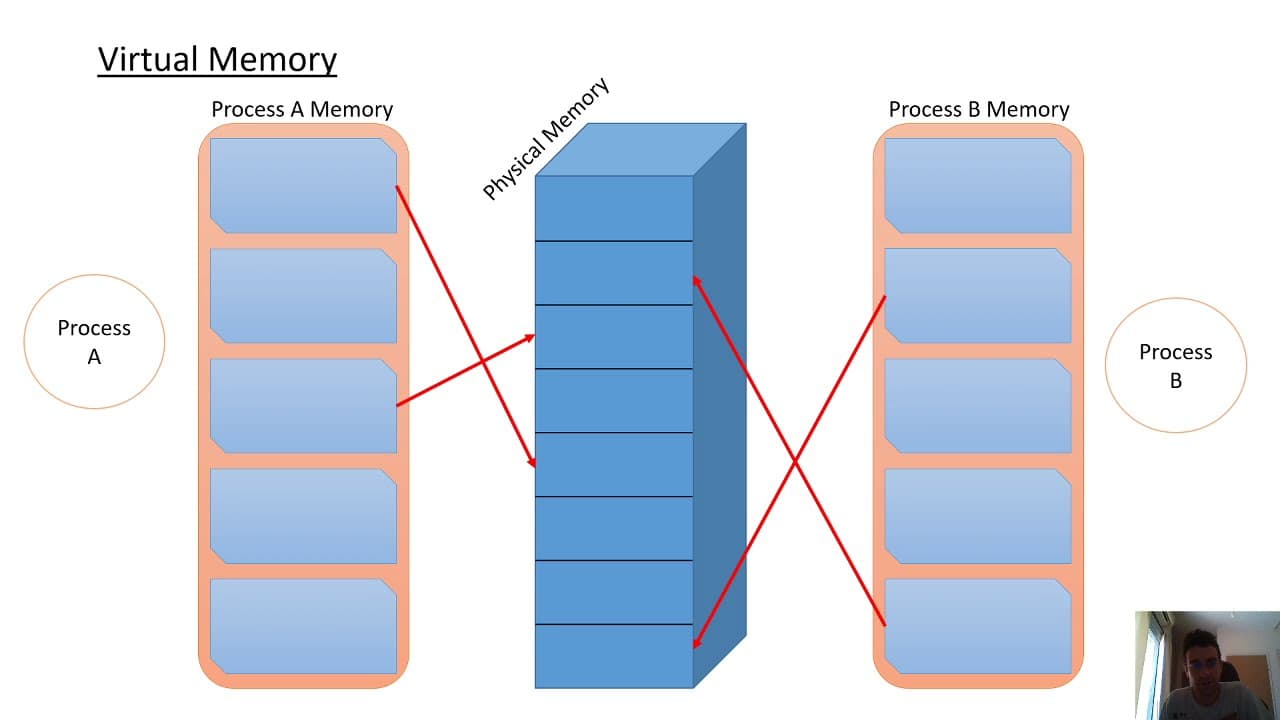
- Virtual memory is an illusion created by the operating system, allowing each process to think it has its own private memory space.
- DLL injection specifically involves injecting a DLL file into the target process's memory space.
- The process requires using specific APIs to open a handle to the target process and allocate memory for the DLL.
- The LoadLibrary function is used to execute the DLL within the target process.
- Monitoring API calls can help detect suspicious activities indicative of process injection.
Install to Summarize YouTube Videos and Get Transcripts
Explore YouTube Video Summarizer or Get YouTube Transcript Extractor
Questions & Answers
Q: How does DLL injection work?
DLL injection works by inserting a malicious DLL into the memory space of a legitimate process, allowing the code to execute within that process's context. This is achieved by identifying the target process, allocating memory, and using specific APIs to inject and execute the DLL. The technique is often used for defense evasion and privilege escalation in cyber attacks.
Q: What is the purpose of DLL injection?
The purpose of DLL injection is to execute malicious code within the context of a legitimate process. This can help attackers evade detection by security software, as the code runs within a trusted process. Additionally, it can be used for privilege escalation, allowing attackers to gain higher-level permissions on a system or network.
Q: What is virtual memory in the context of DLL injection?
Virtual memory is an abstraction created by the operating system, providing each process with the illusion of having its own private memory space. This is managed by the Windows memory manager, which translates virtual addresses into physical addresses in RAM. DLL injection exploits this by inserting a DLL into a target process's virtual memory space, allowing malicious code to execute.
Q: What are the key steps in performing DLL injection?
Key steps in DLL injection include identifying the target process, allocating memory for the DLL, determining the address of the LoadLibrary function, and using specific APIs to inject and execute the DLL. The process starts by opening a handle to the target process and ends with creating a thread to execute the DLL within the target's memory space.
Q: How can DLL injection be detected?
DLL injection can be detected by monitoring specific API calls that are part of the injection process, such as VirtualAlloc, WriteProcessMemory, and LoadLibrary. These calls indicate the allocation of memory, writing of the DLL path, and execution of the DLL within a target process. Suspicious sequences of these calls can signal a potential injection attempt.
Q: What is the role of LoadLibrary in DLL injection?
LoadLibrary is a function used to load a DLL into a process's memory space. In DLL injection, it is crucial for executing the injected DLL within the target process. The malicious process creates a thread in the target process that starts executing at the address of LoadLibrary, which then loads the DLL into the process memory, allowing the malicious code to run.
Q: Why is DLL injection used for privilege escalation?
DLL injection is used for privilege escalation because it allows attackers to execute code within the context of a process that may have higher-level permissions. By injecting a DLL into a privileged process, attackers can gain access to resources and perform actions that require elevated permissions, effectively increasing their control over the system or network.
Q: What are the challenges in mitigating DLL injection?
Mitigating DLL injection involves challenges such as accurately detecting suspicious API calls, distinguishing between legitimate and malicious use of process injection techniques, and implementing security measures that prevent unauthorized code execution. Security software must be able to monitor and analyze process behaviors to identify potential injection attempts without disrupting normal operations.
Summary & Key Takeaways
-
DLL injection allows malicious code to run within the memory space of a legitimate process, often used for evasion and escalation. The process starts by identifying a target process and using APIs to allocate memory and execute the DLL. Understanding virtual memory and specific API calls is crucial for both attackers and defenders.
-
Virtual memory gives processes the illusion of private memory space, managed by the Windows memory manager. DLL injection leverages this by forcing a target process to load a malicious DLL, using specific APIs to allocate memory and execute the code.
-
Detecting DLL injection involves monitoring API calls like VirtualAlloc and LoadLibrary. These calls are part of the process where a malicious DLL is injected into a target process, executing within its memory space. This technique is part of broader process injection tactics used in cyber attacks.
Read in Other Languages (beta)
Share This Summary 📚
Summarize YouTube Videos and Get Video Transcripts with 1-Click
Try YouTube Summary with ChatGPT & Claude or YouTube Transcript Generator