Products
Features
YouTube Video Summarizer
Summarize YouTube videos
Web & PDF Highlighter
Highlight web pages & PDFs
Chat with PDF
Ask any PDF questions with AI
Ask AI Clone
Chat with your highlights & memories
Audio Transcriber
Transcribe audio files to text
Glasp Reader
Read and highlight articles
Kindle Highlight Export
Export your Kindle highlights
Idea Hatch
Hatch ideas from your highlights
Integrations
Obsidian Plugin
Notion Integration
Pocket Integration
Instapaper Integration
Medium Integration
Readwise Integration
Snipd Integration
Hypothesis Integration
Apps & Extensions
Chrome Extension
Safari Extension
Edge Add-ons
Firefox Add-ons
iOS App
Android App
Discover
Discover
Ideas
Discover new ideas and insights
Articles
Curated articles and insights
Books
Book recommendations by great minds
Posts
Essays and notes from readers
Quotes
Inspiring quotes collection
Videos
Curated videos and summaries
Explore Glasp
Glasp Story
How we grew from 0 to 3 million users
Glasp Newsletter
Weekly insights and updates
Glasp Talk
Interview series with great minds
Glasp Blog
Latest news and articles
Glasp Use Cases
Learn how others use Glasp
Build & Support
Glasp API
Access Glasp's API for developers
MCP Connector
Connect Glasp to Claude & ChatGPT
Community
Glasp Reddit Community
Students
Student discount and benefits
FAQs
Frequently Asked Questions
AboutPricing
DashboardLog inSign up

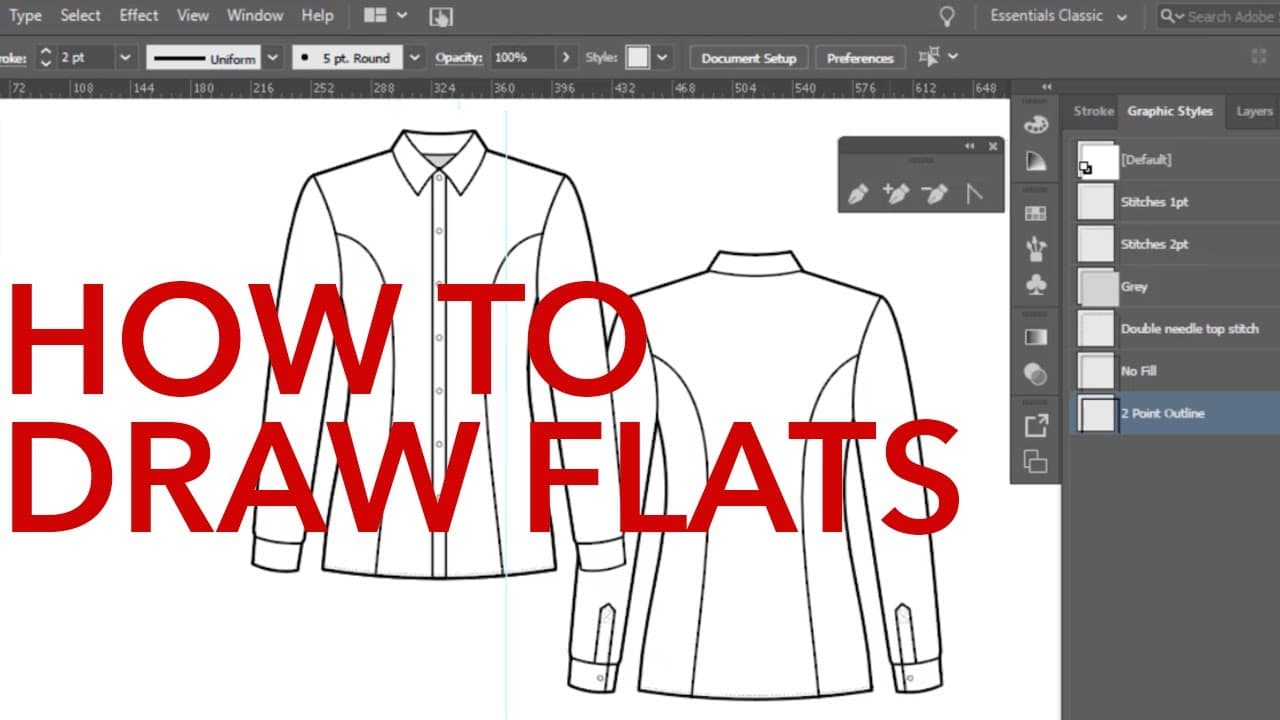
How to Draw Technical Flats in Adobe Illustrator
192.6K views
•
July 7, 2020
by
Zoe Hong
YouTube video player
How to Draw Technical Flats in Adobe Illustrator

TL;DR

Learn how to create a button-down shirt flat in Adobe Illustrator using advanced techniques.

Transcript

hi gang i'm robin schneider and i'm happy to be guest lecturing on zoe hong's channel this week i teach adobe illustrator and photoshop for fashion design at otis college and i've got a bunch of courses on linkedin learning in this video i'm going to show you how to draw a button-down shirt flat in adobe illustrator and just a heads up this video i... Read More

Key Insights

  • 🎨 Robin Schneider is a guest lecturer on Zoe Hong's channel, sharing her expertise in Adobe Illustrator and Photoshop for fashion design.
  • 🫓 Using templates, layers, and various tools, Schneider demonstrates the process of creating a button-down shirt flat in Adobe Illustrator.
  • 🎨 She emphasizes the importance of accuracy and symmetry when drawing fashion designs.
  • 💁 Schneider offers tips and techniques, such as using rulers and guides, to ensure precise measurements and alignment.
  • 🔨 The pen tool, anchor point tool, and reflection are essential tools for creating shapes and details, such as collars, bodices, sleeves, and plackets.
  • ⏯️ The use of symbols, such as buttons and stitches, adds realism and detail to the shirt design.
  • 👤 Schneider's instructional video is suitable for intermediate to advanced users of Adobe Illustrator.

Install to Summarize YouTube Videos and Get Transcripts

Explore YouTube Video Summarizer or Get YouTube Transcript Extractor

Questions & Answers

Q: How does Robin Schneider suggest turning an image into a template in Adobe Illustrator?

To turn an image into a template, go to the layers panel, double click on the layer, check the "template" box, adjust the dim images setting, and lock the template layer.

Q: What tool does Schneider use to draw the collar shape?

Schneider uses the pen tool to draw the collar shape and the anchor point tool to adjust and finesse the curves.

Q: How does Schneider ensure symmetrical alignment when drawing the shirt?

She uses rulers and guides to create a centerline and places guidelines at key reference points, such as the center of the collar and shoulders.

Q: How does Schneider create buttons and stitches on the shirt design?

She uses symbol libraries to access button and stitch symbols, adjusts their size, and places them appropriately on the shirt design.

Summary & Key Takeaways

  • Robin Schneider, a fashion design instructor, teaches how to draw a button-down shirt flat in Adobe Illustrator.

  • She demonstrates the use of templates, layers, rulers, and guides to create accurate and symmetrical designs.

  • Schneider explains how to use the pen tool, anchor point tool, and reflection to draw the collar, bodice, sleeves, and placket of the shirt.


Read in Other Languages (beta)

English

Share This Summary 📚

Summarize YouTube Videos and Get Video Transcripts with 1-Click

Download browser extensions on:

Try YouTube Summary with ChatGPT & Claude or YouTube Transcript Generator

Explore More Summaries from Zoe Hong 📚
How to Choose the Right Fabrics for Fashion Collections thumbnail
How to Choose the Right Fabrics for Fashion Collections
Zoe Hong
My Old Sketches: Improving Over the Years thumbnail
My Old Sketches: Improving Over the Years
Zoe Hong
Interview: Sewing Factory Owner & Pattern Maker Kathleen Fasanella Part 2 thumbnail
Interview: Sewing Factory Owner & Pattern Maker Kathleen Fasanella Part 2
Zoe Hong
How to Start Drawing (Anything) thumbnail
How to Start Drawing (Anything)
Zoe Hong
Interviews with Fashion Industry Professionals thumbnail
Interviews with Fashion Industry Professionals
Zoe Hong
My Series on Drawing and Rendering Faces thumbnail
My Series on Drawing and Rendering Faces
Zoe Hong

Summarize YouTube Videos and Get Video Transcripts with 1-Click

Download browser extensions on:

Try YouTube Summary with ChatGPT & Claude or YouTube Transcript Generator

Apps & Extensions

  • Chrome Extension
  • Safari Extension
  • Edge Add-ons
  • Firefox Add-ons
  • iOS App
  • Android App

Key Features

  • YouTube Video Summarizer
  • Web & PDF Summarizer
  • Web & PDF Highlighter
  • Chat with PDF
  • Ask AI Clone
  • Audio Transcriber
  • Glasp Reader
  • Kindle Highlight Export
  • Idea Hatch

Integrations

  • Obsidian Plugin
  • Notion Integration
  • Pocket Integration
  • Instapaper Integration
  • Medium Integration
  • Readwise Integration
  • Snipd Integration
  • Hypothesis Integration

More Features

  • APIs
  • MCP Connector
  • Blog & Post
  • Embed Links
  • Image Highlight
  • Personality Test
  • Quote Shots
  • Open Graph Checker

Company

  • About us
  • Our Story
  • Blog
  • Community
  • FAQs
  • Job Board
  • Newsletter
  • Pricing
Terms

•

Privacy

•

Guidelines

© 2026 Glasp Inc. All rights reserved.