How to Build Interactive Maps Using Replit
TL;DR
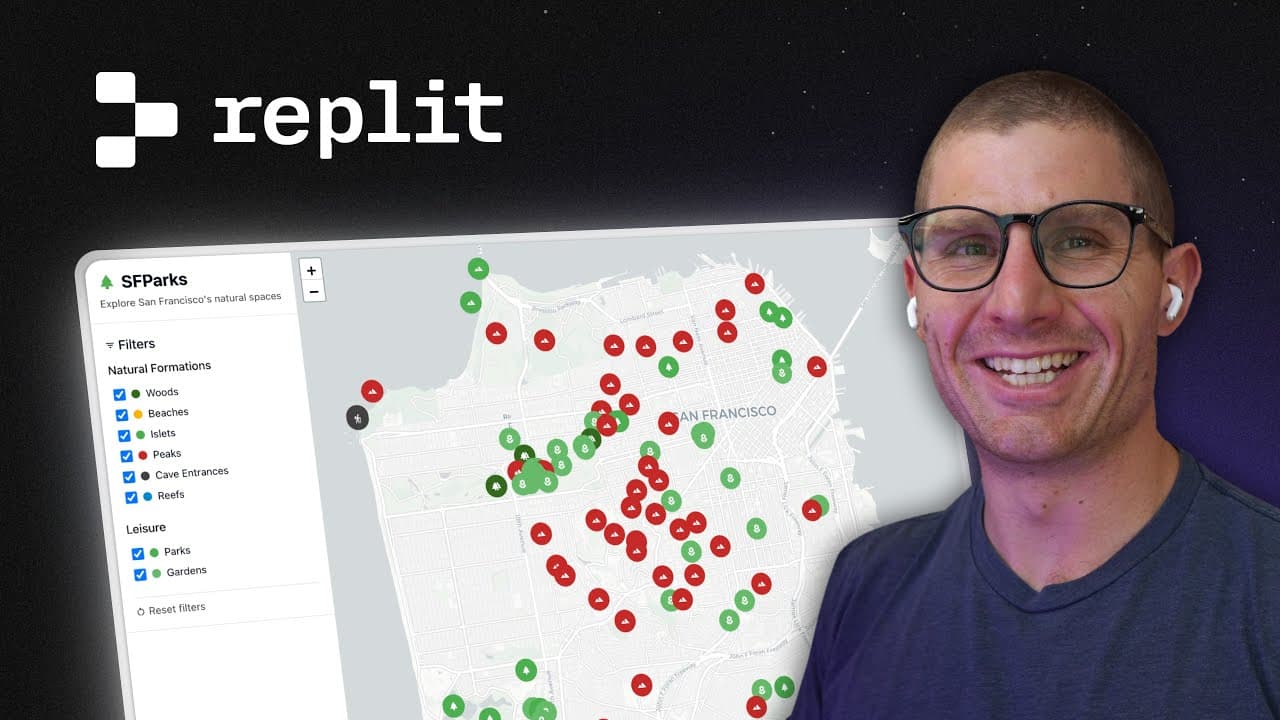
Learn how to create an interactive map of San Francisco's parks using Replit, Leaflet, and Open Street Map data. The process involves leveraging AI tools like Agent and Assistant for coding and debugging, allowing you to build and deploy a full-stack application without writing code manually. This tutorial emphasizes domain-specific knowledge and iterative problem-solving.
Transcript
unlike other vibe coding tutorials I'm going to show you how to go from an idea to a deployed application end to end this tutorial um and we're going to pull in some external data we're going to build with some fun frameworks and create a really interactive map visualization uh so this is going to be more fun than those other tutorials out there an... Read More
Key Insights
- Vibe coding focuses on using AI tools to build applications without manual coding.
- Leaflet is a powerful JavaScript framework for creating interactive maps.
- Open Street Map provides free and extensive map data, including parks and natural formations.
- AI tools like Agent and Assistant on Replit can automate coding and debugging processes.
- Understanding domain-specific knowledge enhances productivity and creativity in app development.
- Agent helps in setting up the development environment and building the application structure.
- Assistant is used for lightweight edits and adding features like dark mode.
- Iterative testing and debugging are crucial in refining AI-generated applications.
Install to Summarize YouTube Videos and Get Transcripts
Explore YouTube Video Summarizer or Get YouTube Transcript Extractor
Questions & Answers
Q: How to create an interactive map using Replit?
To create an interactive map using Replit, start by conceptualizing the map you want to build, such as a map of San Francisco's parks. Use AI tools like Agent to set up the development environment and automate the coding process. Integrate Leaflet for map visualization and fetch data from Open Street Map. Finally, deploy the application directly from Replit.
Q: What is vibe coding?
Vibe coding is a development approach that leverages AI tools to automate coding tasks, allowing developers to focus on conceptualizing and designing applications rather than writing code manually. It involves using AI to generate code, debug errors, and refine applications through iterative testing and problem-solving.
Q: Why use Leaflet for map visualization?
Leaflet is a popular JavaScript framework for creating interactive maps due to its lightweight nature and extensive functionality. It provides a simple API for integrating map features and supports various plugins for additional capabilities. Leaflet's compatibility with Open Street Map data makes it an ideal choice for building map-based applications.
Q: How does Open Street Map data enhance map applications?
Open Street Map offers a vast repository of free map data, including geographical features, parks, and public spaces. This data can be integrated into applications to provide detailed and accurate map visualizations. Its open-source nature allows developers to customize and extend map functionalities according to their needs.
Q: What role does domain-specific knowledge play in vibe coding?
Domain-specific knowledge is crucial in vibe coding as it informs the creation of effective AI prompts and guides the application development process. Understanding the specific requirements and data relevant to the application domain helps in selecting appropriate frameworks, troubleshooting errors, and enhancing the overall functionality of the application.
Q: How does Replit facilitate AI-assisted development?
Replit provides a cloud-based development environment that supports AI-assisted coding through tools like Agent and Assistant. These tools automate the setup, coding, and debugging processes, enabling developers to build and deploy applications without local installations. Replit's platform allows for seamless integration of AI capabilities, making it accessible for developers of all levels.
Q: What are the challenges in AI-driven coding?
AI-driven coding presents challenges such as debugging AI-generated code, ensuring the accuracy of AI outputs, and managing iterative testing. Developers must guide AI tools with precise prompts and domain knowledge to achieve desired outcomes. Understanding the limitations of AI and adopting a trial-and-error approach are essential for successful AI-assisted development.
Q: How can AI tools like Assistant add features to an application?
AI tools like Assistant can add features to an application by making targeted edits and enhancements based on developer prompts. For example, Assistant can implement a dark mode by adjusting CSS styles and map themes. It provides faster, lightweight edits compared to more comprehensive tools like Agent, allowing for quick iterations and refinements in the application.
Summary & Key Takeaways
-
The video demonstrates building an interactive map application using Replit, focusing on San Francisco's parks. It utilizes AI tools like Agent and Assistant to automate coding and debugging, emphasizing the importance of domain-specific knowledge. The process includes setting up a development environment, fetching data from Open Street Map, and deploying the app.
-
Vibe coding involves leveraging AI to reduce manual coding, allowing for rapid prototyping and deployment. The tutorial highlights the use of Leaflet for map visualization and the integration of Open Street Map data. Key skills include effective prompt creation, debugging, and iterative development.
-
The tutorial showcases the power of AI-assisted development, enabling users to create complex applications without writing code. It details the steps of building a full-stack app on Replit, from concept to deployment, while addressing common challenges and solutions in AI-driven coding.
Read in Other Languages (beta)
Share This Summary 📚
Summarize YouTube Videos and Get Video Transcripts with 1-Click
Try YouTube Summary with ChatGPT & Claude or YouTube Transcript Generator
Explore More Summaries from Matt Palmer 📚

Summarize YouTube Videos and Get Video Transcripts with 1-Click
Try YouTube Summary with ChatGPT & Claude or YouTube Transcript Generator