How to Create World Maps in R for Visualizing Data
TL;DR
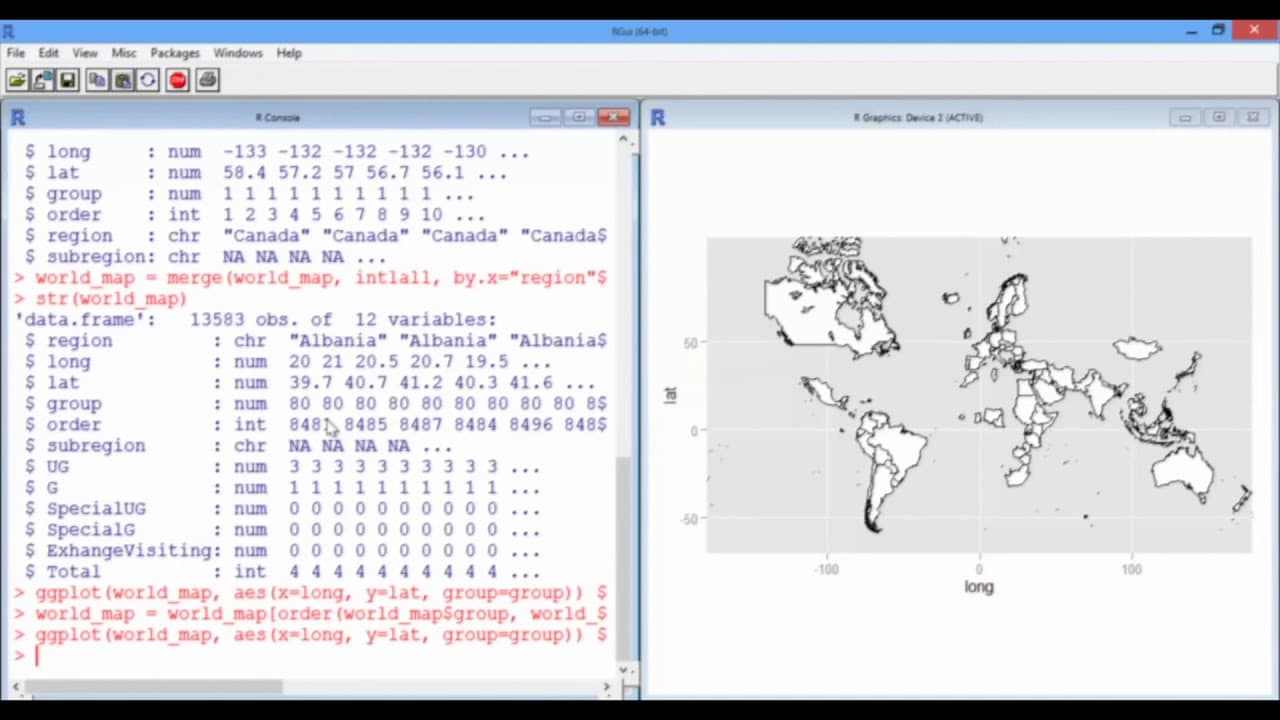
To create world maps in R for visualizing international student data, first load the data from intlall.csv and replace NAs with 0s. Merge this dataset with map_data('world'), reorder based on country, and resolve any naming inconsistencies. Use ggplot with geom_polygon to plot the maps, experimenting with different projections like Mercator and orthographic for varied visualizations.
Transcript
So now we're going to try plotting a world map with a new data set that has the number of international students from each country. So first of all, we're going to need to use the ggmap package, which you may need to install. And we're going to load in the data set, which is called intlall.csv. So read.csv(intlall.csv). And I'm going to do stringsA... Read More
Key Insights
- 🧑🎓 The ggmap package and the worldmap dataset can be used for effective visualization of international student data.
- 🗺️ Cleaning and merging datasets are crucial steps in creating accurate and visually appealing world maps.
- 📛 Resolving naming inconsistencies ensures that all relevant data is included in the visualization.
Install to Summarize YouTube Videos and Get Transcripts
Explore YouTube Video Summarizer or Get YouTube Transcript Extractor
Questions & Answers
Q: How do you create a world map of MIT international students in R?
Load the ggmap package and read intlall.csv with stringsAsFactors = FALSE. Replace NA entries with 0, merge the student data with map_data("world"), reorder the merged rows by group and order, and plot the result with ggplot and geom_polygon.
Q: What information is included in intlall.csv?
Each row corresponds to a country, identified by the Citizenship column. The data includes numbers of undergraduates, graduates, special undergraduates and graduates, exchange or visiting students, and a total column.
Q: Why should NA values in the international student data be changed to 0?
The transcript explains that these entries are not genuinely unknown values; they represent zero students. Replacing them with 0 prepares the country totals for mapping.
Q: How are the world map and MIT student data merged?
Create the map data with map_data("world") and merge it with intlall. Match the region field in the world map data to the Citizenship field in the MIT data.
Q: Why can countries appear as black blobs after merging the data?
The merge can reorder the latitude and longitude points that define each country’s border. When ggplot connects those points in the wrong sequence, polygons crisscross and countries can look like black blobs.
Q: How do you restore country borders after the merge reorders the map data?
Reorder the merged rows first by group and then by the order variable. The group identifies a country, while order preserves the correct sequence of points along its border.
Q: Why were China and Russia missing from the world map?
Their names did not match between the MIT and world map data frames, so the merge dropped them. China was fixed by changing “China (People's Republic Of)” in the Citizenship column to “China,” while Russia was left unresolved in the demonstration for a similar reason.
Q: How can the completed world map display student totals and different projections?
Map longitude to x, latitude to y, and group to group, then use geom_polygon with fill proportional to the total number of students and black country outlines. The example uses a Mercator projection, while the existing lesson summary also identifies an orthographic projection as another option.
Summary & Key Takeaways
-
Use the ggmap package to plot a world map and load the international student data set (intlall.csv).
-
Clean the data by converting NAs to 0s and merge the world map data frame with the international student data frame.
-
Reorder the data in the correct order to prevent misplacement of country borders.
-
Fix naming inconsistencies between the MIT data frame and the world map data frame (e.g., changing "China (People's Republic Of)" to "China").
-
Plot the world map with different projections, such as Mercator and orthographic.
Read in Other Languages (beta)
Share This Summary 📚
Summarize YouTube Videos and Get Video Transcripts with 1-Click
Try YouTube Summary with ChatGPT & Claude or YouTube Transcript Generator
Explore More Summaries from MIT OpenCourseWare 📚
Summarize YouTube Videos and Get Video Transcripts with 1-Click
Try YouTube Summary with ChatGPT & Claude or YouTube Transcript Generator