How to Simulate a BCD to 7-Segment Decoder
TL;DR
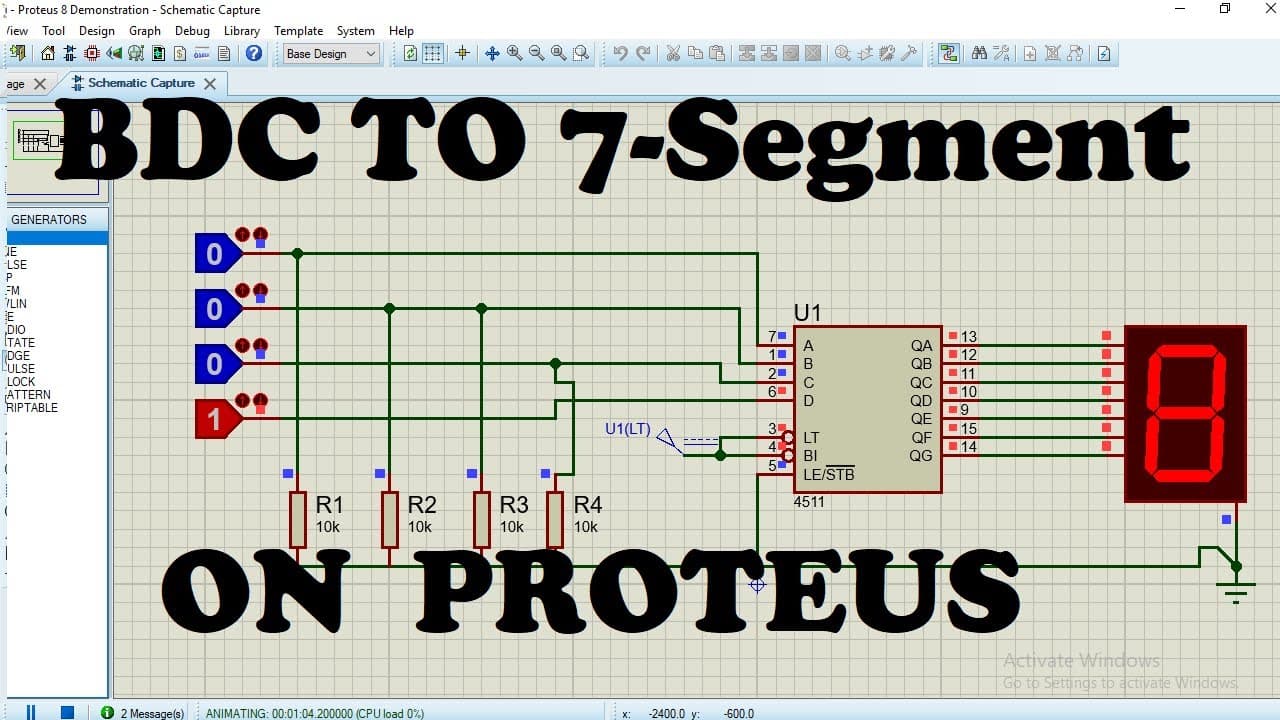
Simulating a BCD to 7-segment decoder is straightforward with a 4511 Common Cathode Display. This tutorial covers selecting and connecting components, including the IC, resistors, and logic states, to visualize how different input combinations lead to corresponding outputs on the display.
Transcript
hi friends in this video i am going to show you how to implement bcd to 7 segment decoder display using 4511 common cathode display okay so first you have to simulate the circuit so you have to click on this schematic capture then this window will appear as you can see here so now you have to pick your devices so here we have required four five one... Read More
Key Insights
- 🔌 The video demonstrates a tutorial on how to implement a BCD to 7-segment decoder display using a 4511 common cathode display, explaining the process step-by-step.
- 🔩 The schematic capture tool allows users to select devices, such as the 4511 IC, resistors, and seven-segment display, required for the circuit simulation.
- 💡 Logic states and a logic probe are utilized in the simulation to configure the inputs and observe the outputs of the decoder display.
- 🔌 Connections are made between the inputs and outputs of the 4511 IC, seven-segment display, and ground using resistors and a DC source.
- 🖥️ The simulation showcases the functioning of the decoder display by displaying the corresponding numbers (0-9) on the seven-segment display based on the input logic states.
- 🔌 Input combinations determine the output, with each number shown on the display associated with a specific logic state configuration.
- 👍 The simulation offers a practical understanding of how a BCD to 7-segment decoder display works and can be used as a learning tool for beginners.
- 🗣️ Viewers are encouraged to ask questions or seek clarification in the comment section if they have any queries regarding the simulation.
Install to Summarize YouTube Videos and Get Transcripts
Explore YouTube Video Summarizer or Get YouTube Transcript Extractor
Questions & Answers
Q: What is the purpose of using a BCD-to-7 Segment Decoder Display?
The BCD-to-7 Segment Decoder Display is used to convert binary-coded decimal (BCD) inputs into signals that can be displayed on a 7-segment display. This enables the representation of decimal numbers using the seven segments of the display.
Q: What is the function of the 4511 IC in this simulation?
The 4511 IC is a CMOS seven-segment BCD-to-seven segment latch/decoder/driver. It takes BCD input and converts it into the corresponding output signals to drive a seven-segment display.
Q: Why is selecting the correct type of seven-segment display important in this simulation?
Selecting the correct type of seven-segment display (common cathode or common anode) is crucial because the wiring and connection methods differ. In this simulation, the common cathode display was used, which requires connecting the segments to the IC in a certain way.
Q: How does changing the logic states affect the output on the 7-segment display?
Changing the logic states of the input pins connected to the 4511 IC determines which segments of the display are turned on or off. Different input combinations will result in different numbers being displayed on the screen.
Q: What is the purpose of the ground connection in this simulation?
The ground connection serves as a reference point for the circuit, providing a common zero voltage potential. It ensures proper functioning of the components and allows the IC to interpret the input signals correctly.
Q: Can this simulation be used to control a physical BCD-to-7 Segment Decoder Display?
No, this simulation is solely for educational and demonstration purposes. To control a physical display, you would need to implement the circuit in the real world using the appropriate components and connections.
Summary & Key Takeaways
-
The video shows how to simulate a BCD-to-7 Segment Decoder using a 4511 Common Cathode Display.
-
It explains how to select and connect the necessary components for the simulation, including the IC, resistor, logic states, and ground.
-
The simulation demonstrates how different input combinations result in varying outputs on the 7-segment display.
Read in Other Languages (beta)
Share This Summary 📚
Summarize YouTube Videos and Get Video Transcripts with 1-Click
Try YouTube Summary with ChatGPT & Claude or YouTube Transcript Generator