Bar graph | Soldiers recruited | Data Interpretation | Reasoning | Part - 15 | Bharath Kumar
TL;DR
Learn to analyze bar graphs of soldier recruitment data from 2005 to 2010.
Transcript
hi everyone welcome to this session in this session I am continuing bar graph data and reputation first of all we need to read the information carefully and then we need to solve the questions according to the given information first of all see the information which is provided in this paragraph here the information is about the number of soldiers ... Read More
Key Insights
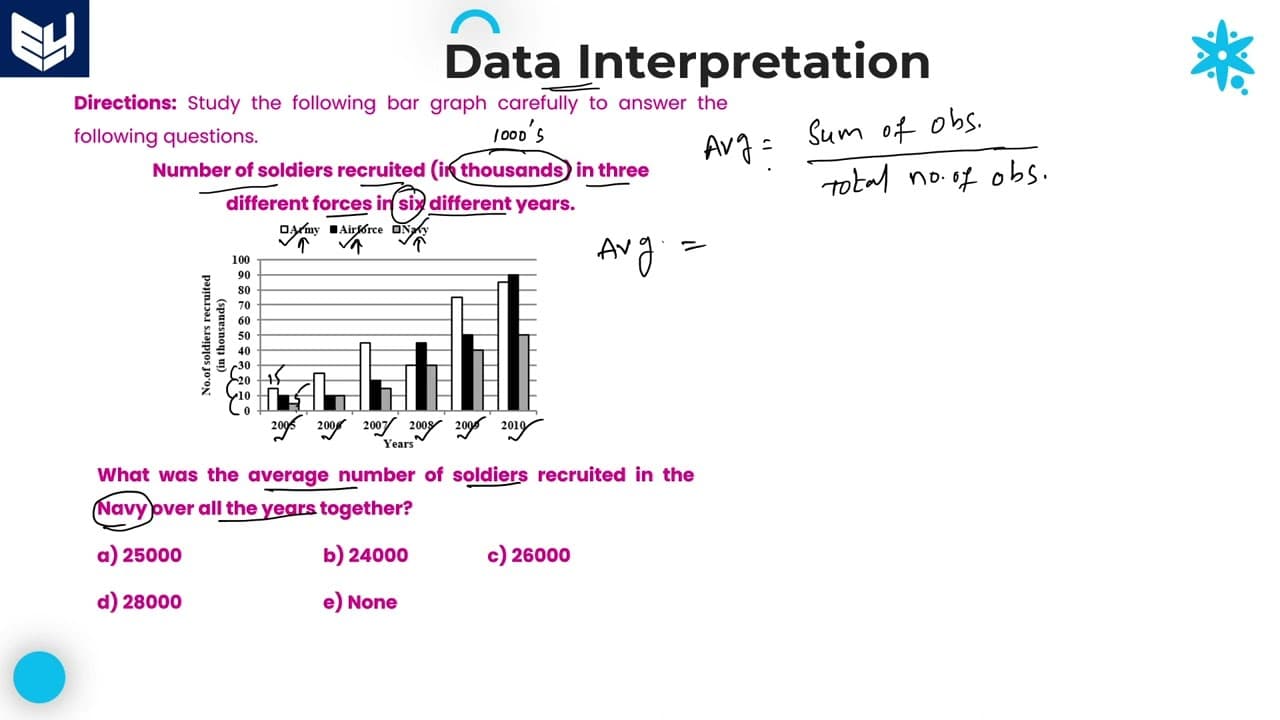
- 📈 The bar graph illustrates recruitment trends in three military branches over six years, highlighting differences in numbers.
- 🤢 Understanding the scale (0-100) is crucial for interpreting the exact values represented by each bar.
- 🍹 Averages can be calculated by summing total recruits and dividing by the number of years.
- 😥 Percentages are determined by comparing figures from different years or categories, reinforcing the relationship between data points.
- 📈 The percentage of recruits categorized by gender showcases trends in diversity within the forces.
- 🥳 Ratios provide a comparative view of recruitment across different forces and years, valuable for assessment.
- 🦻 Awareness of data representation formats (thousands) aids in accurate interpretation and calculation.
Install to Summarize YouTube Videos and Get Transcripts
Explore YouTube Video Summarizer or Get YouTube Transcript Extractor
Questions & Answers
Q: What are the key components of the bar graph described in the content?
The bar graph represents the number of soldiers recruited in three forces (Army, Air Force, and Navy) over six years (2005 to 2010). The values are represented in terms of thousands, requiring multiplication for accurate interpretation. Each year’s data is presented with specific intervals marked on a scale from 0 to 100.
Q: How is the average number of soldiers recruited in the Navy calculated?
To calculate the Navy's average recruitment from 2005 to 2010, the total number of Navy recruits over these years is summed up and then divided by the number of years, which is six. The resultant average is then multiplied by one thousand to reflect the actual number, resulting in 25,000.
Q: How do you determine what percentage the Navy recruitment in 2009 was of Army recruitment in 2006?
To find the percentage, the Navy recruitment number for 2009 (40,000) is divided by the Army recruitment number for 2006 (25,000) and multiplied by 100. This results in a value of 160%, indicating the Navy's recruitment surpassed that of the Army in 2006.
Q: In 2010, if 30% of Air Force recruits were female, how many males were recruited?
From the 90,000 recruits in the Air Force, 30% are females. Hence, 70% are males. Calculating this gives us 70% of 90,000, which equals 63,000 males recruited that year.
Q: What ratio compares Air Force recruitment in 2005 to Army recruitment in 2009?
The ratio is based on the Air Force's recruitment of 10,000 in 2005 and Army's recruitment of 75,000 in 2009. Simplifying this gives a ratio of 2:15, indicating the comparative recruitment figures between the two forces.
Q: What is the approximate percentage decrease in Army recruitment from 2007 to 2008?
The percentage decrease calculation is performed by finding the difference between the two years' recruits (45,000 in 2007 and 30,000 in 2008). This gives a decrease of 15,000, which, when divided by the 2007 figure (45,000), yields approximately 33.33%. Rounding gives a result of around 33%.
Q: Why is it important to multiply the values by thousands or specific figures?
Multiplying by thousands, hundreds, or lakhs is essential for translating the bar graph figures into real numbers. This ensures that the calculations and interpretations of data accurately reflect the context of the recruitment numbers.
Q: What general approach should one take when interpreting bar graphs?
The approach involves careful reading of the data, understanding the scale used, performing necessary calculations such as averages and percentages, and applying these measures to answer specific questions about the data depicted in the graph.
Summary & Key Takeaways
-
The content explains how to interpret a bar graph depicting the recruitment of soldiers across three forces: Army, Air Force, and Navy from 2005 to 2010.
-
It provides detailed methods for calculating averages, percentages, and ratios based on the graph values, emphasizing careful reading of the data.
-
Various example questions demonstrate practical applications of interpreting graph data and performing calculations for recruitment numbers.
Read in Other Languages (beta)
Share This Summary 📚
Summarize YouTube Videos and Get Video Transcripts with 1-Click
Try YouTube Summary with ChatGPT & Claude or YouTube Transcript Generator