How to INSTANTLY Copy YouTube n8n Builds with Claude
TL;DR
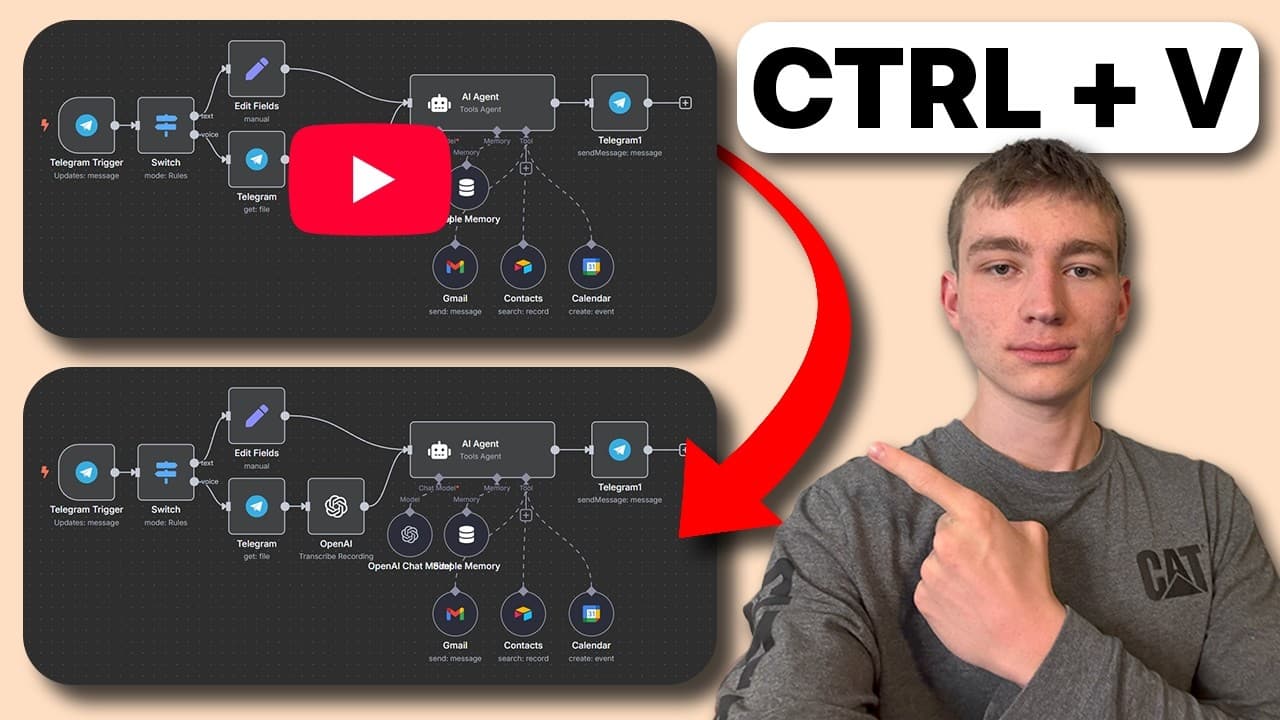
Learn to instantly replicate YouTube n8n workflows using Claude and Gemini.
Transcript
Read and summarize the transcript of this video on Glasp Reader (beta).
Key Insights
- The tutorial demonstrates how to instantly copy n8n workflows from YouTube videos using Claude and Gemini, saving significant time and effort.
- Upgraded versions of Claude and the Opus model are necessary for successfully creating projects and generating accurate workflows.
- The process involves creating a project in Claude, inputting system prompts, and using Nolan Harper's resources for effective setup.
- The tutorial emphasizes the importance of feeding Claude with successful AI agent examples to improve the accuracy of the generated workflows.
- Potential errors in the workflow can be identified and resolved by consulting the original YouTube video for specific instructions.
- The tutorial highlights the current limitations of AI in workflow generation, such as error triggers and incorrect node connections.
- The presenter provides a practical example of troubleshooting workflow issues and offers solutions to enhance the workflow's functionality.
- Additional resources and community support are available through the ACS Syndicate and Telegram for further assistance and updates.
Install to Summarize YouTube Videos and Get Transcripts
Explore YouTube Video Summarizer or Get YouTube Transcript Extractor
Questions & Answers
Q: What is the main purpose of the tutorial?
The main purpose of the tutorial is to teach viewers how to instantly replicate n8n workflows from YouTube videos using Claude and Gemini. This method aims to save users time and effort by automating the workflow creation process, making it more efficient and accessible for those who want to implement similar workflows without building them from scratch.
Q: What are the prerequisites for following this tutorial?
To follow this tutorial, users need access to the upgraded version of Claude and the Opus model, as these are essential for creating projects and generating accurate workflows. Additionally, users should have access to resources from Nolan Harper, which are linked in the description, to set up the system prompts effectively. Basic knowledge of n8n workflows and AI tools is also beneficial.
Q: How does the tutorial address potential workflow errors?
The tutorial addresses potential workflow errors by demonstrating how to consult the original YouTube video for specific instructions on fixing issues. It highlights common errors, such as incorrect node connections and error triggers, and provides practical solutions. By feeding Claude successful AI agent examples, users can improve the accuracy of the generated workflows, reducing the likelihood of errors.
Q: What are the limitations of AI in workflow generation mentioned in the tutorial?
The tutorial mentions several limitations of AI in workflow generation, including the potential for incorrect node connections, error triggers, and inaccuracies in the generated workflows. It emphasizes that while AI tools like Claude and Gemini are improving, they are not yet perfect and may require manual adjustments and troubleshooting to achieve the desired results. Users are encouraged to be aware of these limitations and consult additional resources for assistance.
Q: How can users improve the accuracy of their workflows using Claude?
Users can improve the accuracy of their workflows by feeding Claude with successful AI agent examples they have created in the past. By doing so, Claude gains a better understanding of the desired outcomes and can generate more accurate workflows. The tutorial provides an example AI agent for users who do not have their own, demonstrating how to incorporate it into the project instructions to enhance the workflow's functionality.
Q: What additional resources are available for viewers of the tutorial?
Viewers of the tutorial have access to additional resources and community support through the ACS Syndicate and Telegram. These platforms offer templates, extra help, and early updates on AI developments. The tutorial also links to Nolan Harper's channel, which provides valuable resources and free content related to workflow creation. These resources aim to assist users in staying updated and resolving any issues they may encounter.
Q: How does the tutorial demonstrate troubleshooting techniques?
The tutorial demonstrates troubleshooting techniques by providing a practical example of resolving workflow issues. The presenter shows how to identify errors by consulting the original YouTube video and offers solutions to fix them. For instance, the tutorial explains how to reconfigure nodes and adjust settings to correct inaccuracies. This hands-on approach helps users understand how to address common problems and improve their workflow's performance.
Q: What is the role of Nolan Harper's resources in the tutorial?
Nolan Harper's resources play a crucial role in the tutorial by providing essential setup instructions and system prompts needed for creating accurate workflows. These resources are linked in the description and serve as a foundation for users to follow the tutorial effectively. By utilizing Nolan Harper's content, users can ensure that their Claude projects are set up correctly, leading to more successful workflow generation.
Summary & Key Takeaways
-
This tutorial provides a step-by-step guide on how to replicate n8n workflows from YouTube videos using Claude and Gemini. It requires an upgraded version of Claude, and the Opus model is recommended for optimal results. The process involves creating a project, inputting system prompts, and utilizing resources from Nolan Harper.
-
The tutorial addresses common errors encountered during workflow generation and provides solutions to fix these issues. By feeding Claude successful AI agent examples, users can improve the accuracy of their workflows. The presenter demonstrates troubleshooting techniques and emphasizes the importance of consulting the original YouTube video for guidance.
-
Despite the current limitations of AI in workflow generation, the tutorial showcases the potential of using Claude and Gemini to streamline the process. The presenter offers additional resources and community support through the ACS Syndicate and Telegram, encouraging viewers to stay updated with the latest information and developments in AI technology.
Read in Other Languages (beta)
Share This Summary 📚
Summarize YouTube Videos and Get Video Transcripts with 1-Click
Try YouTube Summary with ChatGPT & Claude or YouTube Transcript Generator
Explore More Summaries from Koen | AI Content Systems 📚

Summarize YouTube Videos and Get Video Transcripts with 1-Click
Try YouTube Summary with ChatGPT & Claude or YouTube Transcript Generator