How to Use Bookmap for Effective Trading
TL;DR
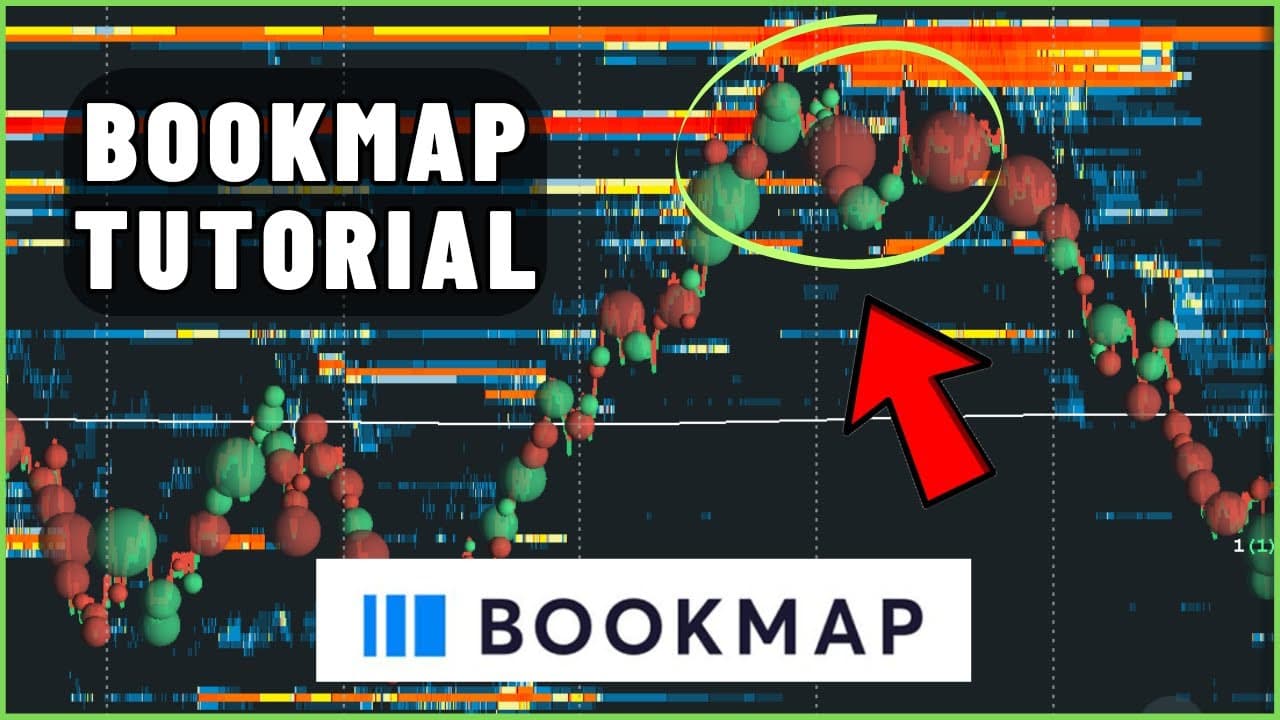
Bookmap is a powerful trading tool that provides detailed insights into market order flow, allowing traders to visualize both current and historical data. By using heat maps and volume profiles, traders can identify key market levels and make informed decisions. Custom settings and add-ons enhance its functionality, making it a vital tool for serious traders.
Transcript
in this video I want to discuss the settings that I use on Bookmap And I'm going to talk about why I believe it's one of the best trading platforms or tools out there And it has to do with just the ease of information how clean certain aspects that the data is presented to me And also it has like this secret feature that I'm going to talk about in ... Read More
Key Insights
- Bookmap offers a unique visualization of market data, showing both current and historical order flow.
- The heat map in Bookmap highlights volume levels that are not visible on traditional candlestick charts.
- Bookmap's replay feature allows traders to review past market conditions and refine their strategies.
- Custom settings in Bookmap can filter out noise, focusing on larger and more significant market orders.
- The tool differentiates between passive and aggressive market participants, aiding in decision-making.
- Volume bubbles in Bookmap indicate completed transactions, showing where market orders hit limit orders.
- Bookmap's add-ons, like Trader Map Light, help to clear data noise by removing irrelevant bracket orders.
- Depth of Market (DOM) in Bookmap provides real-time insights into market activity and trading opportunities.
Install to Summarize YouTube Videos and Get Transcripts
Explore YouTube Video Summarizer or Get YouTube Transcript Extractor
Questions & Answers
Q: How does Bookmap's heat map enhance trading?
Bookmap's heat map enhances trading by providing a visual representation of market order flow, highlighting volume levels that are not visible on traditional candlestick charts. This allows traders to see both current and historical data, identify key market levels, and make informed trading decisions based on the aggregated order book information.
Q: What is the significance of Bookmap's replay feature?
The replay feature in Bookmap is significant because it allows traders to review past market conditions, analyze their trades, and refine their strategies. By going back to specific dates and times, traders can see how the market behaved and identify patterns or setups that can inform future trading decisions, enhancing their overall trading performance.
Q: How do custom settings improve Bookmap's functionality?
Custom settings in Bookmap improve its functionality by allowing traders to filter out noise and focus on larger, more significant market orders. By adjusting contrast and intensity, traders can highlight important data points, such as large buyers or sellers, making it easier to identify key market levels and make informed trading decisions based on clearer, more relevant information.
Q: What role do volume bubbles play in Bookmap?
Volume bubbles in Bookmap play a crucial role by indicating completed transactions where market orders hit limit orders. These bubbles visually represent the interaction between passive and aggressive market participants, showing where significant buying or selling pressure occurs. This information helps traders understand market dynamics and identify potential entry or exit points based on the order flow.
Q: How does the Trader Map Light add-on help traders?
The Trader Map Light add-on helps traders by removing irrelevant bracket orders that can skew the data presented on the heat map. By clearing out these large, non-traditional orders, the add-on provides a clearer view of the actual market activity, allowing traders to focus on significant orders and make more accurate trading decisions based on a cleaner, more precise visualization of the order flow.
Q: What insights does the Depth of Market feature provide?
The Depth of Market (DOM) feature in Bookmap provides real-time insights into market activity by displaying the current order book and showing the volume of buy and sell orders at various price levels. It highlights aggressive buying and selling, helping traders gauge market sentiment and liquidity, and identify potential trading opportunities based on the speed and volume of trades occurring in the market.
Q: Why is Bookmap considered vital for serious traders?
Bookmap is considered vital for serious traders because it offers a detailed and dynamic view of market order flow, providing insights that are not available through traditional trading platforms. Its features, such as the heat map, replay functionality, and custom settings, allow traders to analyze market dynamics, refine their strategies, and make informed decisions, ultimately enhancing their trading performance and profitability.
Q: How can Bookmap's historical data aid in trading?
Bookmap's historical data aids in trading by allowing traders to review past market conditions and analyze how specific events or patterns impacted price movements. This retrospective analysis helps traders identify recurring setups, validate their trading strategies, and learn from past experiences, ultimately improving their ability to anticipate market behavior and make more informed trading decisions in the future.
Summary & Key Takeaways
-
Bookmap provides a comprehensive view of market order flow, showing both current and historical data. Its heat map and volume profiles help traders identify key market levels and make informed decisions. The replay feature allows for strategy refinement by reviewing past market conditions.
-
Custom settings in Bookmap enable traders to filter out noise and focus on significant orders, enhancing their trading strategies. The tool's differentiation between passive and aggressive participants provides valuable insights into market dynamics, aiding in decision-making.
-
Bookmap's add-ons, such as Trader Map Light, improve data clarity by removing irrelevant bracket orders. The Depth of Market feature offers real-time insights, making Bookmap a vital tool for traders looking to capitalize on market opportunities.
Read in Other Languages (beta)
Share This Summary 📚
Summarize YouTube Videos and Get Video Transcripts with 1-Click
Try YouTube Summary with ChatGPT & Claude or YouTube Transcript Generator
Explore More Summaries from Carmine Rosato 📚



Summarize YouTube Videos and Get Video Transcripts with 1-Click
Try YouTube Summary with ChatGPT & Claude or YouTube Transcript Generator