Obsidian Graph View Enhancement with Text Network Analysis and InfraNodus
TL;DR
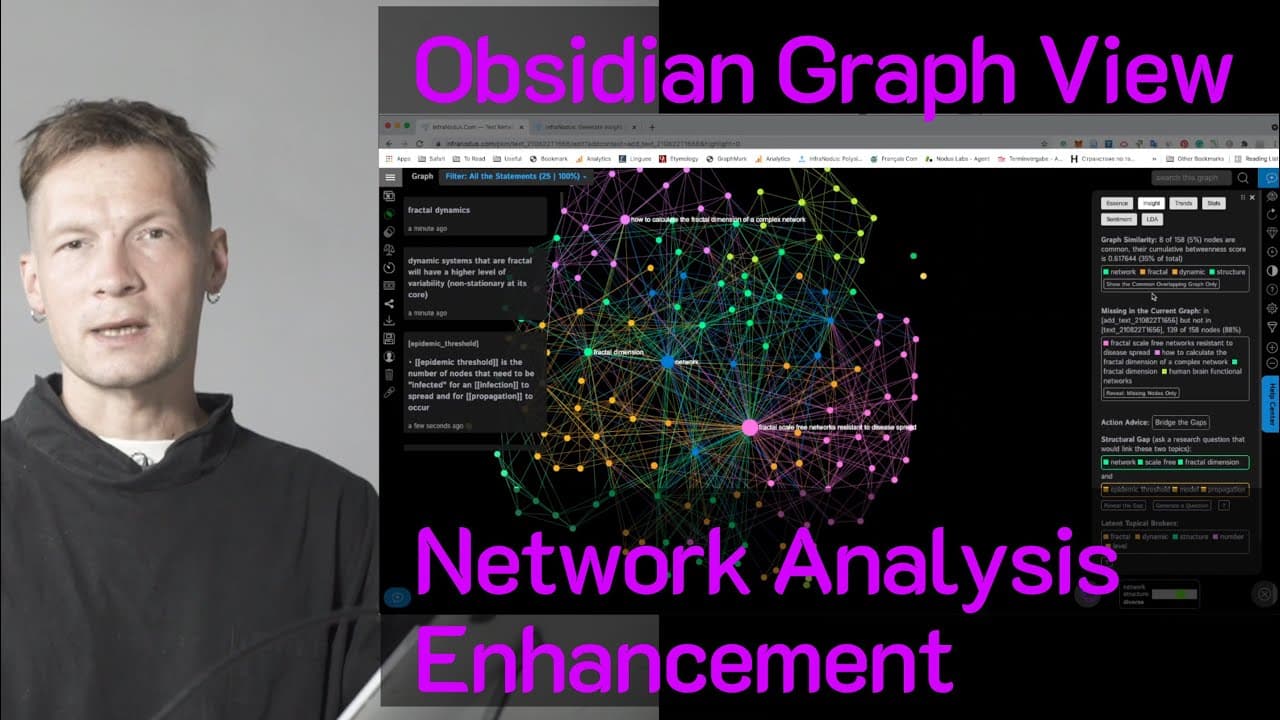
Learn how InfernoDos' text network analysis app can provide additional insights and generate research questions from your Obsidian graph data.
Transcript
hello everyone in this video i'm going to show you how you can use text network analysis to generate the kind of insight that would not be available using the standard obsidian graph view i'll show you what i mean here i have the obsidian graph and as you can see it's quite disconnected i don't really know what to do with this graph apart from just... Read More
Key Insights
- 🔍 Obsidian graph view is disconnected and limited in providing insights, while Inferno Do's text network analysis app offers additional insights based on network science in visualizing and analyzing data.
- 📊 Inferno Do's imports Obsidian data and applies network analysis algorithms to identify main topics, connections, and influential nodes, allowing users to gain a quick understanding of the discourse.
- 🔄 Users can interact with the graph by removing influential nodes to reveal hidden information and structural gaps, enabling further development and exploration of the discourse.
- 💡 Inferno Do's AI recommendation system identifies structural gaps in the discourse and generates research questions to encourage further connections and deepen the understanding of the topic.
- 🔄 Inferno Do's framework emphasizes exploring singularities, making connections, focusing on multiplicities, zooming in on specific topics, and iteratively disconnecting and connecting nodes to inspire new ideas and insights.
- 🔄 Inferno Do provides the option to import obsidian data with wiki links and text separately, allowing users to filter and explore connections and concepts individually, enhancing the understanding of the knowledge.
- 🔎 Users can export data from Inferno Do with additional metadata, enabling the enrichment of the original graph view in Obsidian or experimentation with new connections.
- 🖊️ Inferno Do also allows users to start with a new text, generate AI-generated ideas using GPT-3 in relation to the topic, and compare it with existing discourse, facilitating idea generation and comparison for a comprehensive understanding.
Install to Summarize YouTube Videos and Get Transcripts
Explore YouTube Video Summarizer or Get YouTube Transcript Extractor
Questions & Answers
Q: How does InfernoDos' text network analysis app enhance the understanding of an Obsidian graph?
InfernoDos' app analyzes the connections and relationships within an Obsidian graph, providing insights into main topics, influential nodes, and structural gaps that may not be apparent from the standard graph view. By visualizing the data and applying network analysis algorithms, the app helps users extract useful information and identify opportunities for further development.
Q: How does InfernoDos' AI recommendation system work?
InfernoDos' AI recommendation system analyzes the discourse structure and identifies topics that could be connected but are not yet linked. It then suggests making connections between these topics and generates research questions using GPT-3 AI. The system aims to bridge structural gaps and inspire further exploration in the discourse.
Q: What benefit does InfernoDos' text network analysis provide over the standard Obsidian graph view?
While the standard graph view in Obsidian visualizes connections between nodes, it may not provide additional insights beyond the visual representation. In contrast, InfernoDos' text network analysis app applies network science algorithms to uncover main topics, identify influential nodes, and reveal structural gaps, enabling users to gain a deeper understanding of their knowledge.
Q: Can InfernoDos help users explore specific concepts within their Obsidian graph?
Yes, InfernoDos allows users to select and remove influential nodes from the graph, revealing the concepts hiding behind them. This feature helps users delve deeper into specific topics and explore related ideas and connections within their Obsidian graph.
Q: What different methods are available for importing Obsidian data into InfernoDos?
InfernoDos offers two methods for importing Obsidian data. The first method imports the data as a graph, visualizing both the wiki links and the text together. The second method separates the wiki links and other concepts into two distinct types of nodes, allowing users to filter and focus on the connections between wiki links or the text individually.
Q: Can InfernoDos be used to compare new ideas with an existing Obsidian discourse?
Yes, InfernoDos provides a feature where users can write a new text and compare it with an existing Obsidian graph. By uploading the new text and selecting the original Obsidian files, users can visualize the differences and connections between their new ideas and the established discourse. This feature helps users ensure their new discourse covers important topics and can provide fresh perspectives.
Q: How can exporting data from InfernoDos back to Obsidian be beneficial?
Exporting data from InfernoDos to Obsidian allows users to enrich their graph view by including newly generated ideas and connections. It can help users experiment with making more connections and provide additional metadata for their nodes. By incorporating the exported data, users can expand and explore their knowledge graph further in Obsidian.
Summary & Key Takeaways
-
Text network analysis can provide valuable insights by visualizing the connections and relationships between nodes in an Obsidian graph.
-
InfernoDos' app imports Obsidian data and applies network analysis algorithms to identify main topics, influential nodes, and structural gaps in the discourse.
-
The app also offers an AI recommendation system to suggest connections between topics and generate research questions for further exploration.
Read in Other Languages (beta)
Share This Summary 📚
Summarize YouTube Videos and Get Video Transcripts with 1-Click
Try YouTube Summary with ChatGPT & Claude or YouTube Transcript Generator
Explore More Summaries from Nodus Labs 📚
Summarize YouTube Videos and Get Video Transcripts with 1-Click
Try YouTube Summary with ChatGPT & Claude or YouTube Transcript Generator