Revit Tutorial - Toposolid and Cutting Topography No Building Pad Revit 2024
TL;DR
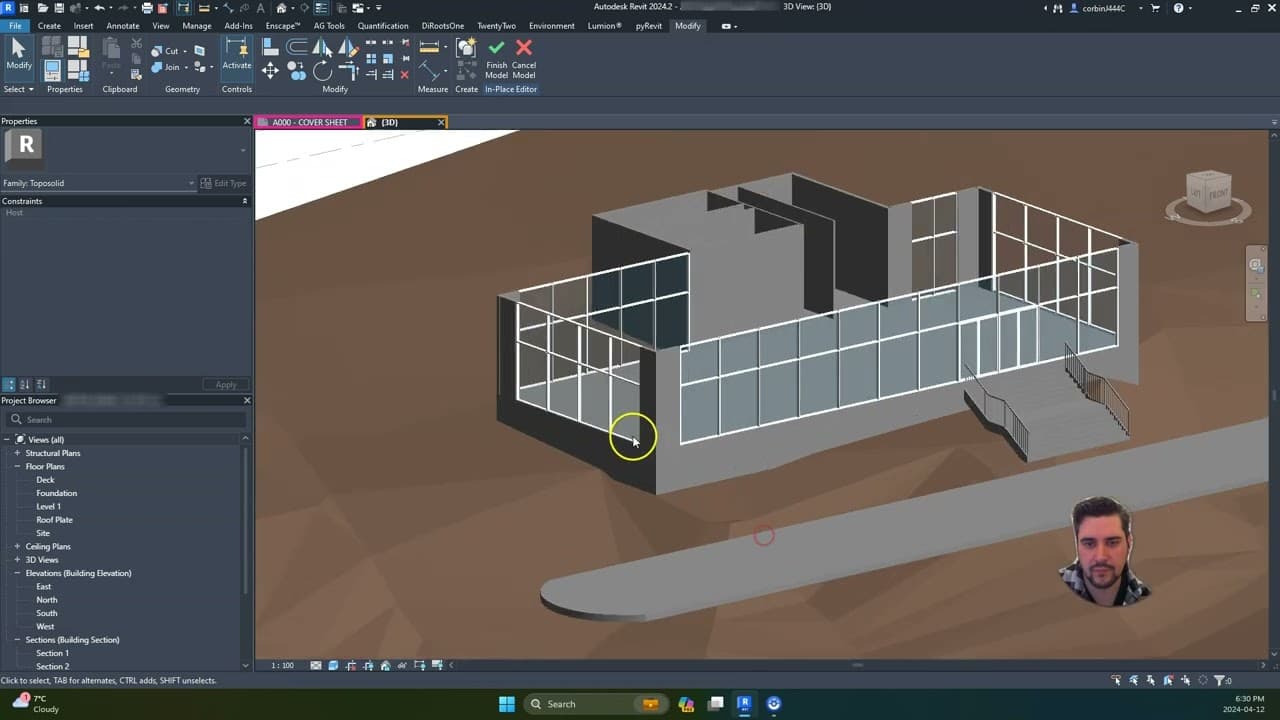
Learn how to cut topography in Revit 2024 without building pads.
Transcript
so for our project for this class uh for most people we've been working in Revit 2022 or 2023 um so I have one student that is working in 2024 and with that being said uh in 2024 topography was changed from being what we call a topo surface to be uh too solid and so again this item is actually a solid not a uh a flat element and so there's a few di... Read More
Key Insights
- Revit 2024 introduces a change from topo surfaces to toposolids, which are considered solid elements rather than flat ones.
- Building pads are no longer available in Revit 2024, requiring alternative methods to manipulate topography.
- Users can cut into the toposolid to accommodate building structures by creating voids and extrusions.
- Increasing the thickness of the toposolid can help manage issues related to slope and topography manipulation.
- The process involves using the 'model in place' feature to create extrusions and voids in the toposolid.
- Voids need to be strategically placed and converted from solids to achieve the desired cut in the topography.
- The tutorial provides a step-by-step method to cut topography for building placement and entry areas.
- Adjustments to the topography can include adding floors and steps to accommodate design needs.
Install to Summarize YouTube Videos and Get Transcripts
Explore YouTube Video Summarizer or Get YouTube Transcript Extractor
Questions & Answers
Q: How does Revit 2024 handle topography differently?
In Revit 2024, topography is handled as a solid element known as a toposolid, rather than a flat surface. This change means that traditional building pads are no longer used, and instead, users must cut into this solid to accommodate structures. This approach allows for more flexibility in manipulating the topography for design purposes.
Q: What are the steps to cut topography in Revit 2024?
The steps to cut topography in Revit 2024 involve using the 'model in place' feature to create extrusions and voids. Users start by creating a solid extrusion and then convert it into a void. This void is strategically placed and used to cut into the toposolid, allowing for the accommodation of building structures.
Q: Why is it recommended to increase the thickness of the toposolid?
Increasing the thickness of the toposolid is recommended to manage issues that arise from slopes and topography manipulation. A thicker toposolid provides more material to work with, reducing the likelihood of errors or issues when creating cuts or voids. This approach ensures a more stable and flexible design process.
Q: What role do voids play in manipulating toposolids?
Voids play a crucial role in manipulating toposolids by allowing users to cut out sections of the solid element. By creating an extrusion and converting it into a void, users can strategically place these voids to remove unwanted portions of the toposolid, accommodating building placements and design needs without traditional building pads.
Q: How can users ensure accurate placement of voids?
To ensure accurate placement of voids, users should utilize tools such as the pick line tool to align the voids with existing structures like walls. Careful measurement and alignment are essential to ensure that the voids cut precisely where needed, allowing for accurate accommodation of building elements within the toposolid.
Q: Can the size of the cut in the toposolid be adjusted?
Yes, the size of the cut in the toposolid can be adjusted by expanding or contracting the void. Users can modify the dimensions of the void to make larger or smaller cuts, depending on the design requirements. This flexibility allows for precise tailoring of the topography to meet specific architectural needs.
Q: What adjustments can be made after cutting the toposolid?
After cutting the toposolid, users can make several adjustments, such as adding floors or steps to the cut areas. These adjustments help integrate the building structure with the modified topography, ensuring a seamless transition between the building and the surrounding landscape. Users can also further refine the topography to enhance the overall design.
Q: What are the benefits of using toposolids in Revit 2024?
Using toposolids in Revit 2024 offers several benefits, including increased flexibility in topography manipulation and the ability to create more complex terrain modifications. By treating topography as a solid, users can achieve more precise cuts and adjustments, facilitating the integration of architectural elements with the surrounding landscape more effectively.
Summary & Key Takeaways
-
The tutorial discusses changes in Revit 2024, where topography is now treated as a solid, called toposolid, rather than a flat surface. It explains how to cut into this solid to accommodate buildings, replacing the traditional building pads.
-
The process involves using the 'model in place' feature to create extrusions and voids. By converting these voids from solids, users can cut out sections of the toposolid to fit building structures.
-
Key techniques include increasing the thickness of the toposolid to manage slopes, strategically placing voids, and adjusting the topography by adding floors or steps as needed for design flexibility.
Read in Other Languages (beta)
Share This Summary 📚
Summarize YouTube Videos and Get Video Transcripts with 1-Click
Try YouTube Summary with ChatGPT & Claude or YouTube Transcript Generator