How to Use Your Phone as a Camera Monitor in 2025
TL;DR
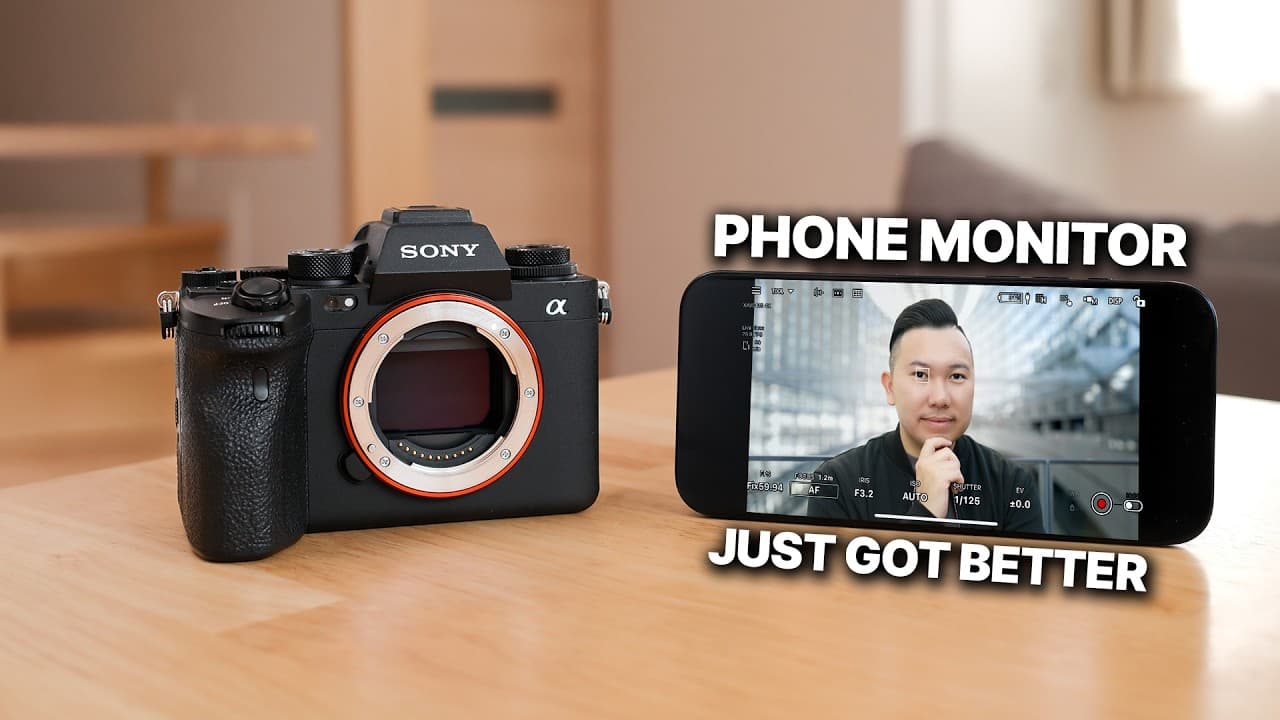
To use your phone as a camera monitor, download the Monitor and Control app for advanced features like recording control and camera settings, all for free. Hardwired connections via USB-C ensure minimal latency, while alternatives like the Sony Creators app and Axon Simo provide versatile options for different cameras. Each solution caters to different needs, but the dedicated app significantly enhances usability.
Transcript
Read and summarize the transcript of this video on Glasp Reader (beta).
Key Insights
- The Monitor and Control app offers powerful features for camera monitoring, including starting/stopping recording and adjusting camera settings like shutter speed and ISO, all for free.
- Hardwiring your phone via USB-C is recommended for stable connections and minimal latency when using it as a camera monitor.
- The Sony Creators app provides basic monitoring features and works in both video and photo modes, making it a versatile choice for Sony camera users.
- Monitor Plus is a more compatible app that offers both free and paid versions, providing pro monitoring features like LUT display and waveforms.
- Imaging Edge Mobile works with older cameras but suffers from significant latency issues when used wirelessly.
- The Axon Simo 4K video transmitter device offers a robust solution for connecting phones to cameras via HDMI, compatible with any camera with an HDMI port.
- Each solution has its pros and cons, with hardwired connections generally providing better performance compared to wireless options.
- Using these apps and devices can transform a phone into a professional-grade camera monitor, though they may not fully replace dedicated monitors like Atomos.
Install to Summarize YouTube Videos and Get Transcripts
Explore YouTube Video Summarizer or Get YouTube Transcript Extractor
Questions & Answers
Q: What are the main features of the Monitor and Control app?
The Monitor and Control app offers several powerful features for camera monitoring. It allows users to start and stop recording, adjust camera settings such as shutter speed, ISO, and aperture, and provides tools like grid lines for framing shots. Additionally, it includes professional monitoring tools like histograms and false color, all for free.
Q: Why is hardwiring recommended over wireless connections?
Hardwiring your phone via USB-C is recommended because it provides a more stable connection with minimal latency compared to wireless options. This ensures real-time monitoring and control, which is crucial for professional video production. Wireless connections can suffer from choppy frame rates and delayed responses, affecting the overall monitoring experience.
Q: How does the Sony Creators app differ from the Monitor and Control app?
The Sony Creators app offers basic monitoring features and is compatible with both video and photo modes, making it a versatile choice for Sony camera users. However, it is not as robust as the Monitor and Control app when it comes to pro monitoring features. It allows for wireless or wired connections and supports photo tethering, sending images directly to the phone.
Q: What are the limitations of the Imaging Edge Mobile app?
Imaging Edge Mobile is limited by significant latency issues when used wirelessly, which can make real-time monitoring challenging. While it allows for basic camera control and supports both photo and video modes, the latency can be unacceptable for many users. Hardwiring is recommended to mitigate this issue, though it may not be possible with all camera models.
Q: What does the Axon Simo device offer for camera monitoring?
The Axon Simo is a 4K video transmitter device that connects phones to cameras via HDMI, supporting any camera with an HDMI port. It provides powerful monitoring tools without additional costs and is compatible with both USB-C and Lightning connections. This makes it a versatile solution for users with various camera and phone models.
Q: What are the pros and cons of using Monitor Plus?
Monitor Plus offers both free and paid versions, providing pro monitoring features like LUT display and waveforms. It is compatible with a wide range of camera models. However, it does not offer the best monitoring quality, and while it allows changing focus modes, it lacks touch tracking autofocus, requiring manual focus adjustments on the camera.
Q: Can these apps and devices fully replace dedicated camera monitors?
While these apps and devices offer a range of features that can transform a phone into a professional-grade camera monitor, they may not fully replace dedicated monitors like Atomos. Dedicated monitors typically provide sharper previews, better clarity, more color accuracy, and support for external recording, which are crucial for high-end video production.
Q: What is the significance of using a coil USB-C cable?
Using a coil USB-C cable is significant because it offers flexibility and convenience when connecting your phone to the camera. It helps maintain a stable connection with minimal latency, crucial for real-time monitoring. The coil design prevents tangling and allows for easy adjustment of cable length, making it ideal for field use.
Summary & Key Takeaways
-
In 2025, phones can be effectively used as camera monitors with apps like Monitor and Control, offering advanced features for free. Hardwired connections via USB-C are recommended for stability and minimal latency.
-
Sony Creators app and Monitor Plus provide versatile solutions for different camera models, with varying levels of pro features. Imaging Edge Mobile offers a basic solution for older cameras but suffers from latency.
-
Axon Simo offers a comprehensive solution for connecting phones to cameras via HDMI, supporting both USB-C and Lightning connections. Each method has its strengths and limitations, catering to different user needs.
Read in Other Languages (beta)
Share This Summary 📚
Summarize YouTube Videos and Get Video Transcripts with 1-Click
Try YouTube Summary with ChatGPT & Claude or YouTube Transcript Generator
Explore More Summaries from Jason Vong 📚
Summarize YouTube Videos and Get Video Transcripts with 1-Click
Try YouTube Summary with ChatGPT & Claude or YouTube Transcript Generator