Eplan Pro Panel Beginner Course - Workspace, different standard views, rotate etc. (free preview)
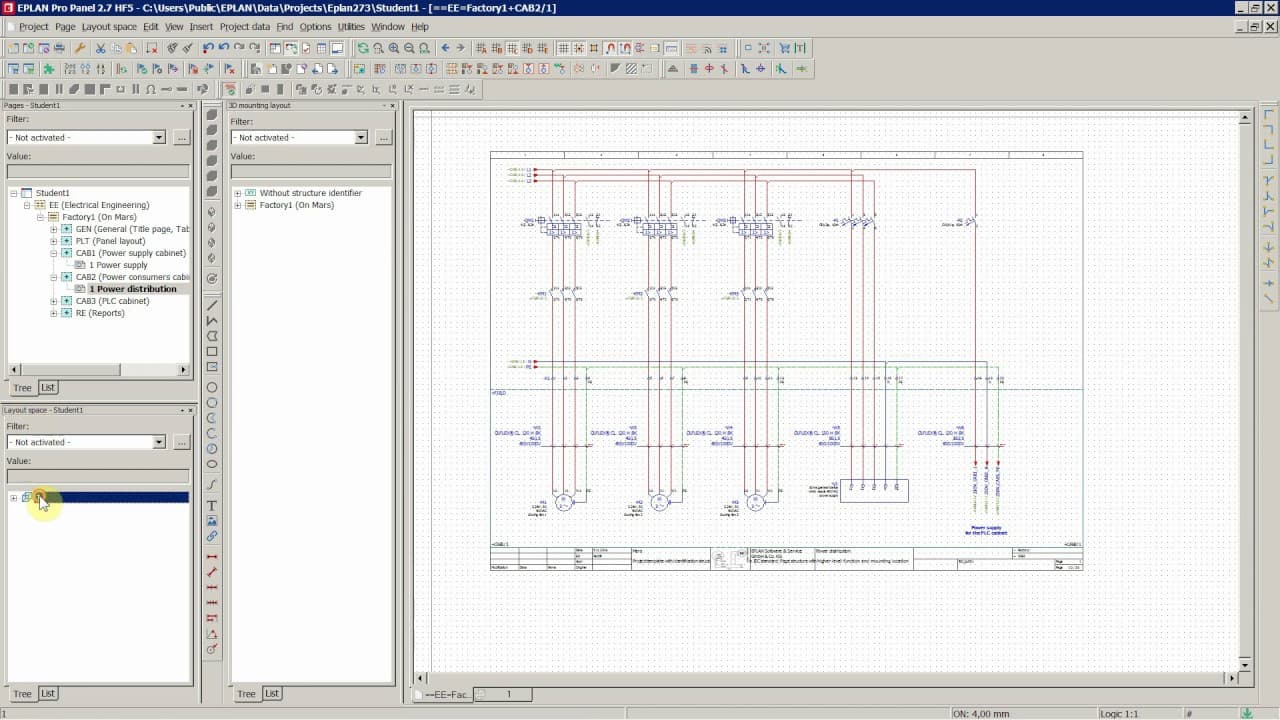
TL;DR
Learn EPLAN Pro Panel workspace and basic functions.
Transcript
Read and summarize the transcript of this video on Glasp Reader (beta).
Key Insights
- EPLAN Pro Panel and Electric P8 are integrated, allowing users to switch between workspaces. This integration facilitates a streamlined workflow for users working on electrical designs and panel layouts.
- The video emphasizes the importance of understanding default workspaces in EPLAN, as they provide foundational structures for creating complex electrical designs and layouts efficiently.
- Creating a new layout space in EPLAN Pro Panel involves setting up a 3D layout environment. This setup is crucial for visualizing and managing electrical components and their spatial arrangements.
- The video provides a step-by-step guide on inserting enclosures and components into the 3D layout space, which is essential for building accurate and functional electrical assemblies.
- Users are encouraged to utilize Siemens and Phoenix Contact parts databases, which offer a wide range of components necessary for comprehensive electrical design projects.
- The tutorial highlights the significance of importing part data into the EPLAN parts database, ensuring that all necessary components are available for design and assembly.
- Switching between Electric P8 and Pro Panel functions is crucial for managing different aspects of a project, such as schematics and layout spaces, and requires understanding of the software's interface.
- The video promises further exploration of advanced functions, such as rotating and handling components, which are vital for detailed and precise electrical design work.
Install to Summarize YouTube Videos and Get Transcripts
Explore YouTube Video Summarizer or Get YouTube Transcript Extractor
Questions & Answers
Q: What is the significance of switching between workspaces in EPLAN?
Switching between workspaces in EPLAN is significant because it allows users to access different sets of functions and tools tailored to specific tasks, such as schematic design or panel layout. This flexibility is crucial for efficiently managing complex electrical design projects and ensuring that all aspects of a project are handled appropriately.
Q: How does the video suggest handling Siemens and Phoenix Contact parts?
The video suggests using Siemens and Phoenix Contact parts databases to source necessary components for electrical design projects. It provides guidance on importing part data into the EPLAN parts database, ensuring that users have access to a comprehensive range of components required for building accurate and functional electrical assemblies.
Q: What is the process of creating a new layout space in EPLAN Pro Panel?
Creating a new layout space in EPLAN Pro Panel involves setting up an empty 3D layout environment. Users can then insert enclosures and other components into this space, which is essential for visualizing and managing the spatial arrangement of electrical components. This process is a foundational step in building detailed and precise electrical assemblies.
Q: Why is it important to import part data into the EPLAN parts database?
Importing part data into the EPLAN parts database is important because it ensures that all necessary components are readily available for design and assembly. This step is crucial for maintaining an organized and efficient workflow, allowing users to easily access and utilize the parts needed for their electrical design projects.
Q: What are the benefits of integrating Electric P8 with Pro Panel?
The integration of Electric P8 with Pro Panel offers several benefits, including streamlined workflow and access to a comprehensive set of tools for electrical design and panel layout. This integration allows users to seamlessly switch between different functions, enhancing efficiency and productivity in managing complex electrical design projects.
Q: How does the video address the use of connection symbols in EPLAN?
The video explains that connection symbols in EPLAN become active when working in the schematics or circuit diagrams, while Pro Panel functions are active in the layout space. Understanding when and how to use these symbols is crucial for effectively managing different aspects of a project and ensuring accurate electrical designs.
Q: What future topics does the video promise to cover?
The video promises to cover advanced functions in future tutorials, such as rotating and handling components within the EPLAN Pro Panel. These topics are vital for users looking to gain a deeper understanding of the software and improve their skills in detailed and precise electrical design work.
Q: What disclaimer does the video provide regarding the tutorial content?
The video provides a disclaimer stating that the owner of the YouTube channel is not a certified trainer or partner for EPLAN products. The tutorials are solely the work of the channel owner and are not endorsed or certified by the manufacturer of EPLAN software. For official training and support, viewers are advised to contact EPLAN Software & Service GmbH & Co. KG.
Summary & Key Takeaways
-
The video provides an introduction to working in EPLAN Pro Panel, focusing on navigating and switching between different workspaces within the software. It emphasizes the integration between EPLAN Electric P8 and Pro Panel, which is crucial for managing complex electrical design projects.
-
A detailed explanation is given on creating new layout spaces and inserting enclosures, which are fundamental steps in building 3D electrical assemblies. The tutorial also covers the use of Siemens and Phoenix Contact parts databases for sourcing necessary components.
-
The tutorial explains the process of importing part data into the EPLAN parts database, ensuring all components required for a project are available. It also discusses the importance of switching between Electric P8 and Pro Panel functions to manage different project aspects effectively.
Read in Other Languages (beta)
Share This Summary 📚
Summarize YouTube Videos and Get Video Transcripts with 1-Click
Try YouTube Summary with ChatGPT & Claude or YouTube Transcript Generator