How to Create a Comprehensive Habit Tracker in Obsidian
TL;DR
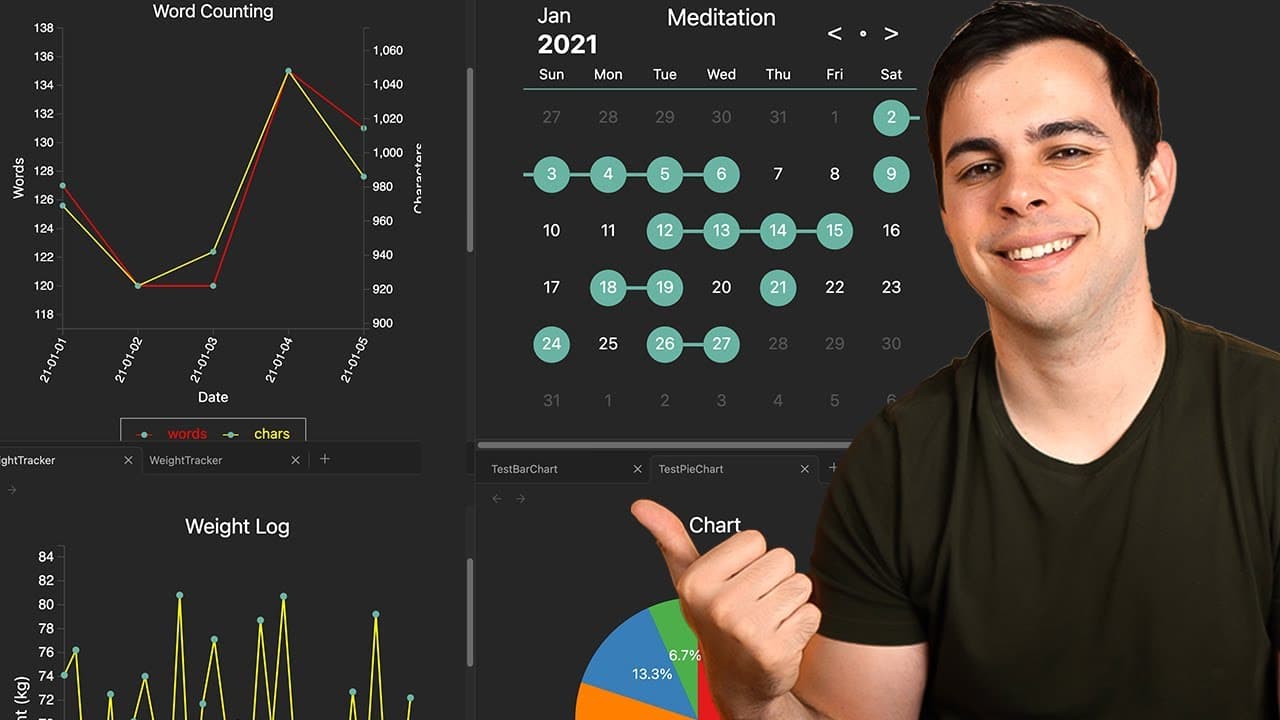
Set up a detailed habit tracker in Obsidian using the Tracker Plugin to monitor various activities like meditation, weight, work, and mood. Customize your trackers with visual representations and automated data logging to enhance habit tracking and progress analysis.
Transcript
in today's video we're going to set up habit tracker's weight trackers work trackers and many more we're gonna do all of this using the very powerful obsidian tracker plugin this plugin is so powerful that I completely replace the paid app that I've been using for years while doing a better job at it and keeping my data local in this video I'll be ... Read More
Key Insights
- 😫 The Obsidian Tracker Plugin is a powerful tool for setting up and tracking various habits in Obsidian.
- 🏋️ Using annotations and daily note templates, you can automate the process of tracking habits, such as meditation, weight, work, words written, and mood.
- 👻 The plugin allows for customization, including adding titles, changing colors, adjusting axis labels, and choosing different visualization options.
- 👻 Multiple trackers can be bundled in one output, allowing for easy comparison and analysis.
- 🛤️ The plugin provides a convenient way to view and analyze data, making it easier to track progress and achieve goals.
- 😒 The use of habit trackers can help with building habits and maintaining consistency.
- 💁 The recommended book, "Atomic Habits" by James Clear, emphasizes the importance of habit formation and provides insights on how to build and sustain habits.
- 📔 Short Form, a book summary platform, offers detailed and insightful summaries that can enhance the understanding and application of book concepts.
Install to Summarize YouTube Videos and Get Transcripts
Explore YouTube Video Summarizer or Get YouTube Transcript Extractor
Questions & Answers
Q: What is the Obsidian Tracker Plugin used for?
The Obsidian Tracker Plugin is used to set up and track various habits, including weight, work, words written, and mood, in Obsidian.
Q: How do you install and enable the Obsidian Tracker Plugin?
To install the plugin, go to the community plugins section in Obsidian and search for "Obsidian Tracker." Install and enable the plugin from there.
Q: How can you set up a habit tracker for meditation?
To set up a habit tracker for meditation, add an annotation to your daily notes template, specifying whether you did or didn't meditate each day. Use the tracker plugin to create a query that searches the front matter of your notes for the meditation annotation.
Q: Can you customize the output of the habit trackers?
Yes, you can customize the output of the habit trackers by adding a title, changing the colors, adjusting the axis labels, and choosing between different visualization options, such as line graphs or bar charts.
Q: What other trackers can you set up using the Obsidian Tracker Plugin?
Besides habit trackers, you can also set up trackers for weight, work, words written, and mood using the Obsidian Tracker Plugin.
Q: Can you view multiple trackers in one output?
Yes, you can bundle multiple trackers into one output by creating a query that includes multiple search targets, allowing you to visualize and analyze different data points together.
Q: How can you add trackers to your dashboard in Obsidian?
To add trackers to your dashboard in Obsidian, create a new row and use the Obsidian Tracker Plugin commands to display the desired trackers. You can customize the size and appearance of the trackers to fit your dashboard layout.
Key Insights:
- The Obsidian Tracker Plugin is a powerful tool for setting up and tracking various habits in Obsidian.
- Using annotations and daily note templates, you can automate the process of tracking habits, such as meditation, weight, work, words written, and mood.
- The plugin allows for customization, including adding titles, changing colors, adjusting axis labels, and choosing different visualization options.
- Multiple trackers can be bundled in one output, allowing for easy comparison and analysis.
- The plugin provides a convenient way to view and analyze data, making it easier to track progress and achieve goals.
- The use of habit trackers can help with building habits and maintaining consistency.
- The recommended book, "Atomic Habits" by James Clear, emphasizes the importance of habit formation and provides insights on how to build and sustain habits.
- Short Form, a book summary platform, offers detailed and insightful summaries that can enhance the understanding and application of book concepts.
- Smart scales and productivity methods like the Pomodoro Technique can further enhance habit tracking and productivity efforts.
Summary & Key Takeaways
-
The video demonstrates how to install and enable the Obsidian Tracker Plugin in Obsidian.
-
It shows how to set up a habit tracker for tracking daily habits, such as meditation, using annotations and daily note templates.
-
The video also explains how to create and customize trackers for weight, work, words written, and mood, with options to visualize the data in line graphs, bar charts, and more.
Read in Other Languages (beta)
Share This Summary 📚
Summarize YouTube Videos and Get Video Transcripts with 1-Click
Try YouTube Summary with ChatGPT & Claude or YouTube Transcript Generator
Explore More Summaries from FromSergio 📚




Summarize YouTube Videos and Get Video Transcripts with 1-Click
Try YouTube Summary with ChatGPT & Claude or YouTube Transcript Generator